> ## Documentation Index
> Fetch the complete documentation index at: https://docs.fermata.run/llms.txt
> Use this file to discover all available pages before exploring further.
# Edge features
> Edge is the preview channel. What it is, how to turn it on, and the five features that sit behind it in the build you have today.
Fermata has two release channels. Stable is what you get out of the box. Edge is the preview channel: it reveals features that are built and usable but not finished enough to be on by default.
Edge is a switch inside the app you already have, not a separate download. Nothing reinstalls, and nothing about your projects changes. The features simply appear.
## Turning it on
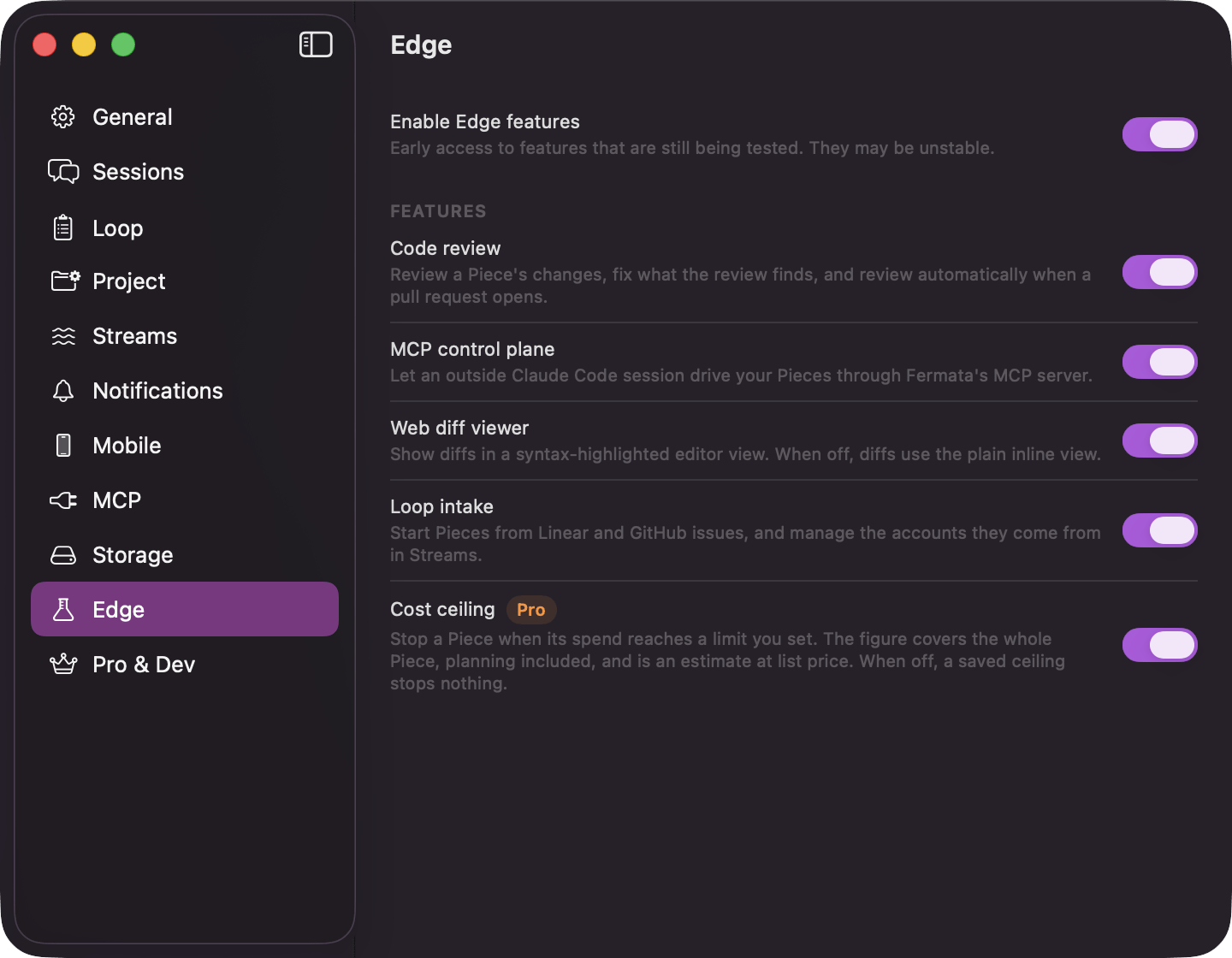
Open Settings with **⌘,** and go to the **Edge** pane. It is listed on both channels, because it is the only place to turn Edge on. The first row is **Enable Edge features**, captioned "Early access to features that are still being tested. They may be unstable."
Under it sits a "Features" card with one switch per preview feature, so you can try them one at a time. The card is disabled until the channel switch is on. Turning the channel back off never touches the per-feature switches: a feature you had on stays saved, and comes back exactly as you left it when you turn Edge on again.
A feature is available only when both its own switch and the channel switch are on. Turning either one off hides every surface the feature owns.
 ## What is behind Edge today
Five switches, in the order the pane lists them.
**Code review.** "Review a Piece's changes, fix what the review finds, and review automatically when a pull request opens." With it on, the **Run Code Review Before PR** pass appears in the Loop and Project panes and on a piece's flow configuration, and a finished piece gains its **Run Code Review** action. See [review and the pull request](/piece/review-and-pull-request).
**MCP control plane.** "Let an outside Claude Code session drive your Pieces through Fermata's MCP server." With it on, an **MCP** pane appears in Settings carrying the **Fermata MCP server** switch. Turning the feature off shuts a running server down, whatever that switch says. See [filing work from outside](/loop/filing-work-from-outside) for what an outside agent can actually do.
**Web diff viewer.** "Show diffs in a syntax-highlighted editor view. When off, diffs use the plain inline view." Same content either way; Edge is the better reading experience.
**Loop intake.** "Start Pieces from Linear and GitHub issues, and manage the accounts they come from in Streams." With it on, Settings → Streams appears to connect an account, and an issue can be picked from the empty spec screen, the New Piece sheet, or the Backlog **+**. See [starting from an issue](/loop/from-an-issue#three-ways-in) for the whole flow, including the picker and what the branch and pull request do with the issue key.
**Cost ceiling.** "Stop a Piece when its spend reaches a limit you set. The figure covers the whole Piece, planning included, and is an estimate at list price. When off, a saved ceiling stops nothing." This row is marked "Pro" and needs that tier; below it the switch stays disabled.
## Edge features can change
That is the trade. A preview feature can be reworked, renamed, or withdrawn between releases, and Fermata can also turn one off remotely if it turns out to be causing trouble. The switch being on does not guarantee the feature is there.
Nothing behind Edge touches how your work is stored. Your specs, strategies, worktrees, branches, and pull requests are the same on both channels, so switching back and forth is safe.
## What is behind Edge today
Five switches, in the order the pane lists them.
**Code review.** "Review a Piece's changes, fix what the review finds, and review automatically when a pull request opens." With it on, the **Run Code Review Before PR** pass appears in the Loop and Project panes and on a piece's flow configuration, and a finished piece gains its **Run Code Review** action. See [review and the pull request](/piece/review-and-pull-request).
**MCP control plane.** "Let an outside Claude Code session drive your Pieces through Fermata's MCP server." With it on, an **MCP** pane appears in Settings carrying the **Fermata MCP server** switch. Turning the feature off shuts a running server down, whatever that switch says. See [filing work from outside](/loop/filing-work-from-outside) for what an outside agent can actually do.
**Web diff viewer.** "Show diffs in a syntax-highlighted editor view. When off, diffs use the plain inline view." Same content either way; Edge is the better reading experience.
**Loop intake.** "Start Pieces from Linear and GitHub issues, and manage the accounts they come from in Streams." With it on, Settings → Streams appears to connect an account, and an issue can be picked from the empty spec screen, the New Piece sheet, or the Backlog **+**. See [starting from an issue](/loop/from-an-issue#three-ways-in) for the whole flow, including the picker and what the branch and pull request do with the issue key.
**Cost ceiling.** "Stop a Piece when its spend reaches a limit you set. The figure covers the whole Piece, planning included, and is an estimate at list price. When off, a saved ceiling stops nothing." This row is marked "Pro" and needs that tier; below it the switch stays disabled.
## Edge features can change
That is the trade. A preview feature can be reworked, renamed, or withdrawn between releases, and Fermata can also turn one off remotely if it turns out to be causing trouble. The switch being on does not guarantee the feature is there.
Nothing behind Edge touches how your work is stored. Your specs, strategies, worktrees, branches, and pull requests are the same on both channels, so switching back and forth is safe.