> ## Documentation Index
> Fetch the complete documentation index at: https://docs.fermata.run/llms.txt
> Use this file to discover all available pages before exploring further.
# Models and providers
> Run Fermata on Claude via Anthropic, Amazon Bedrock, or Google Vertex, pick a model per run, and mirror a company gateway's own curated picker.
The model underneath Fermata is a choice you make. Claude via Anthropic, Amazon Bedrock, and Google Vertex all work today, and the phases, the readiness score, and the review behave the same whichever you run. See [the architecture overview](/reference/architecture) for why the engine is swappable.
## Providers are detected from your environment
Fermata has no provider-credential form. It detects your provider from your environment and routes accordingly, the same way the Claude Code CLI does, checked in this order:
| Signal | Provider |
| - | - |
| `CLAUDE_CODE_USE_BEDROCK` set | Amazon Bedrock |
| `CLAUDE_CODE_USE_VERTEX` set | Google Vertex |
| A non-Anthropic `ANTHROPIC_BASE_URL` in your Claude settings or environment | Gateway |
| None of the above | Claude via Anthropic |
Configure the provider's own credentials the way that provider expects (AWS, Google Cloud, or the gateway's own auth), and Fermata inherits them.
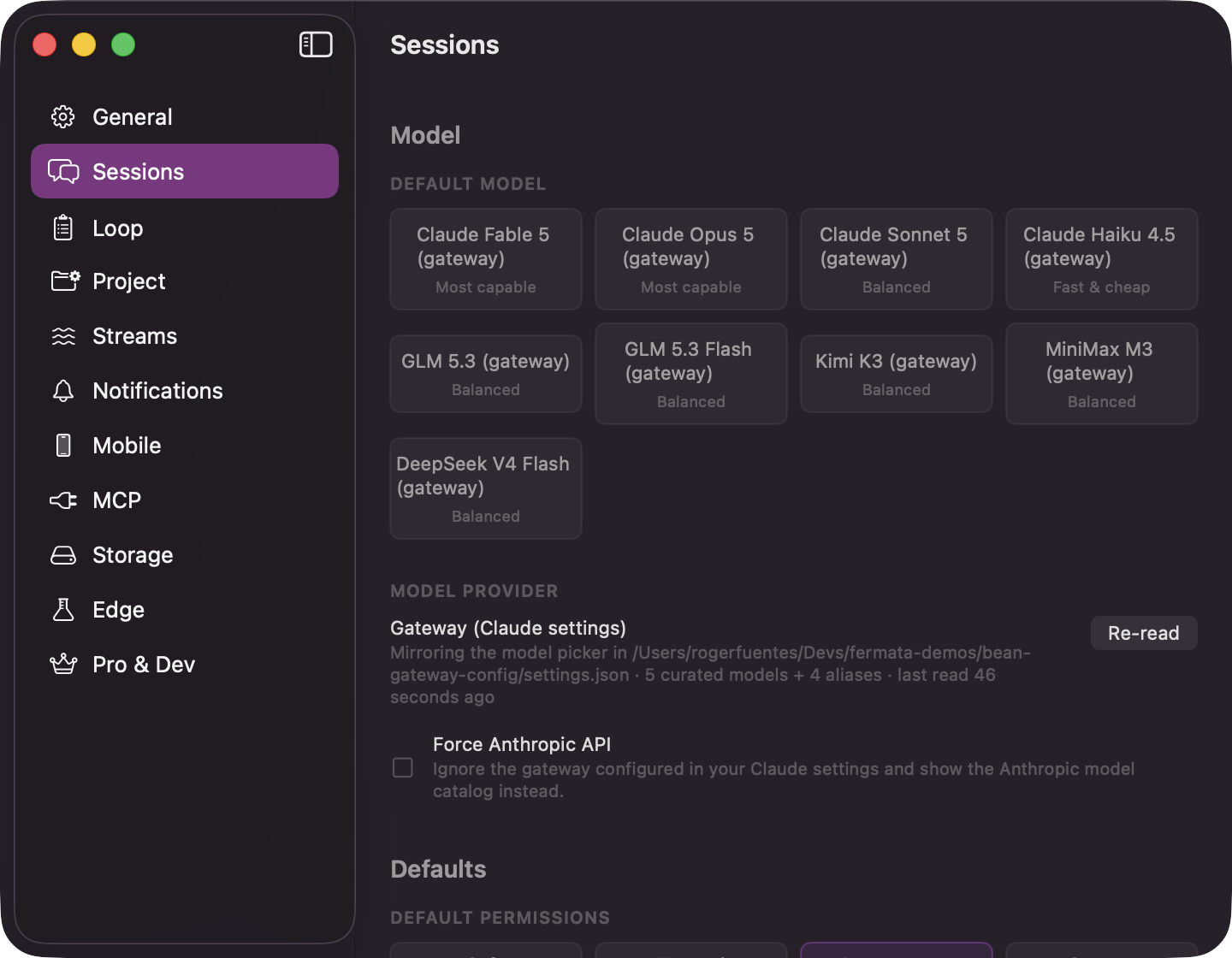
The "Model Provider" card in Settings → Sessions shows what was detected and, for anything but the direct API, a **Force Anthropic API** checkbox that ignores the detection and sends model IDs to the direct API unchanged; when a gateway is detected it also carries a **Re-read** button to pick up a change.
Fermata runs on your own Claude setup and your own billing. Nothing here is free or included; the provider you point it at is the one that bills you.
## Three places you pick a model
The Settings model picker chooses the app's default. Three chips override it for a single interview or a single run:
| Chip | Where | Governs | Locks |
| - | - | - | - |
| New Piece chip | The New Piece sheet, next to the Autonomy row | The spec interview only | Once the interview starts. Tooltip: "Model for this piece's spec interview. It is fixed once the interview starts." |
| Spec-approval chip | The spec-approval control, beside **Mark Spec Ready** (or the lane's own approve verb) | Strategy, Agents, and Review, the remaining phases of this piece | Recorded on the piece the moment you pick it, but a phase carrying its own Flow Configuration override still wins. Tooltip: "Model for the remaining phases of this piece: strategy, agents and review. The pick is recorded on the piece straight away. The spec phase keeps the model it ran on." |
| Code Review header chip | The Code Review step's header, beside Depth and the effort chip | This run's Code Review pass, including its Fix and Comment turns | Not written back to the piece; locks while a review is running and again once its findings are on screen, so the settings never disagree with the result they produced. Re-run unlocks it. Its tooltip reads "Model this review runs on, and the model its Fix and Comment turns run on", and adds that it applies to this run only, leaving the piece's own review setting alone. |
A fourth chip, **Explore model**, sits beside the interview composer's model chip rather than replacing it: it picks the model the spec's Explore subagents run on, seeded from a remembered fast, economical default rather than from the interview's own model. See [interview and spec](/piece/interview-and-spec) for where it sits and what picking it changes.
Every one of these chips lists the same catalog, filtered to whatever the bound project's provider actually offers, so a pick can never name a model that project cannot run.
## Pick a model per run
The picker is organized by what the model is for, and it reflects the current catalog, which can update without an app release.
* "Balanced" is the default tier: fast, and capable enough for the bulk of coding work.
* "Most capable" is for jobs that are genuinely hard, like tricky refactors and architecture calls.
* "Fast & cheap" is there for the lightest work.
* Options whose name ends in "1M" carry the extended 1M-token context window. Pick one when a run genuinely needs that much context.
The bundled catalog is **Fable 5**, **Opus 5 1M**, and **Opus 5** under "Most capable", **Sonnet 5** under "Balanced", which is the default, and **Haiku** under "Fast & cheap". The catalog updates remotely, so the picker can show a different list from this page.
Set the app default under Settings → Loop → **Default Model** for pieces, and Settings → Sessions → **Default Model** for standalone sessions. You can override the model per piece and per session, so an expensive run does not have to set the default for everything else. A piece takes its model when it is created and then keeps it: changing the default later does not move a piece that already exists.
## A gateway's own picker
Companies commonly put Claude Code behind an LLM gateway (LiteLLM and similar). They pin the gateway in `/settings.json` with an `env` block, and curate which models the CLI's own `/model` menu offers under `modelPicker.options`. Fermata reads the same file and mirrors the same list, so every chip on this page shows models the gateway can actually serve instead of the Anthropic catalog IDs it may not recognize.
```json theme={null}
{
"modelPicker": {
"options": [
{
"model": "gateway/claude-opus",
"label": "Opus (gateway)",
"description": "$15 / 1M tokens, 200K context"
}
]
},
"env": {
"ANTHROPIC_BASE_URL": "https://gateway.example.com",
"ANTHROPIC_DEFAULT_SONNET_MODEL": "gateway/claude-sonnet",
"ANTHROPIC_DEFAULT_SONNET_MODEL_NAME": "Sonnet (gateway)"
}
}
```
Two things in that file feed the picker:
* `modelPicker.options`: a curated list, each entry a `model` ID, a menu `label`, and an optional `description` shown as a tooltip (price, latency, context).
* `ANTHROPIC_DEFAULT_FABLE_MODEL`, `_OPUS_MODEL`, `_SONNET_MODEL`, and `_HAIKU_MODEL` (each with an optional `_NAME` variant for the display label): family redirects. Fermata shows each as an entry in the tier its family stands in for, so a Fable or Opus alias sorts under "Most capable", a Sonnet alias under "Balanced", and a Haiku alias under "Fast & cheap".
Fermata reads only those keys. Every other key in the file, including any credential the `env` block carries (an `ANTHROPIC_AUTH_TOKEN`, for instance), is skipped at parse time and never copied into app state. A gateway whose `ANTHROPIC_BASE_URL` resolves to `api.anthropic.com` is treated as the direct API, not a gateway: only a different host flips the picker over.
A gateway with an `ANTHROPIC_BASE_URL` but no `modelPicker.options` and no aliases still works: Fermata falls back to showing the Anthropic catalog and passes its IDs through to the gateway unchanged.
The "Model Provider" card in Settings → Sessions shows the mirror as it stands: the settings file's path, how many curated models and aliases it found, when it last read the file, and a **Re-read** button to pick up an edit without relaunching. A settings file that exists but fails to parse as JSON shows its own error inline: "Could not read settings.json: the file is not valid JSON." Every count and path on this card is global; a project with its own Claude config directory reads its own picker instead, so its chips can disagree with this card without either being wrong.
 ### Force Anthropic API
When a gateway or a cloud provider is detected, the provider card offers **Force Anthropic API**: a checkbox that ignores the detection and sends model IDs straight to Anthropic's own API. Its caption for a detected gateway reads exactly: "Ignore the gateway configured in your Claude settings and show the Anthropic model catalog instead." Turning it on switches every chip back to the built-in catalog immediately; turning it off restores the mirrored list.
## Effort
Effort tunes how much reasoning the model spends per turn. The options are **Auto**, **Low**, **Medium**, **High**, **Extra High**, and **Max**. Auto lets the model decide; the rest pin it.
You set effort at three levels, most specific wins:
* **App default.** Settings → Loop → **Default Effort** (and Project Settings for a per-project override).
* **Per piece.** In the flow configuration, as **Reasoning effort for all stages**.
* **Per stage.** Override a single phase when it needs more thinking than the rest.
Higher effort costs more and takes longer; lower effort is cheaper and faster. Match it to the difficulty of the work rather than pinning everything to Max.
### Force Anthropic API
When a gateway or a cloud provider is detected, the provider card offers **Force Anthropic API**: a checkbox that ignores the detection and sends model IDs straight to Anthropic's own API. Its caption for a detected gateway reads exactly: "Ignore the gateway configured in your Claude settings and show the Anthropic model catalog instead." Turning it on switches every chip back to the built-in catalog immediately; turning it off restores the mirrored list.
## Effort
Effort tunes how much reasoning the model spends per turn. The options are **Auto**, **Low**, **Medium**, **High**, **Extra High**, and **Max**. Auto lets the model decide; the rest pin it.
You set effort at three levels, most specific wins:
* **App default.** Settings → Loop → **Default Effort** (and Project Settings for a per-project override).
* **Per piece.** In the flow configuration, as **Reasoning effort for all stages**.
* **Per stage.** Override a single phase when it needs more thinking than the rest.
Higher effort costs more and takes longer; lower effort is cheaper and faster. Match it to the difficulty of the work rather than pinning everything to Max.