> ## Documentation Index
> Fetch the complete documentation index at: https://docs.fermata.run/llms.txt
> Use this file to discover all available pages before exploring further.
# Settings
> Every pane in Fermata's settings, what each control does, and which ones you are most likely to change on day one.
Settings opens with **⌘,** and is organized as panes down the left, in this order: General, Sessions, Loop, Project, Streams, Notifications, Mobile, MCP, Storage, Edge, and Pro & Dev. Three of them appear only when they apply: **Streams** and **MCP** need [Edge](/configuration/edge) plus their own feature switch (**Loop intake** and **MCP control plane**), and **Mobile** needs Pro. **Edge** is listed on every channel, because it is the only place to turn Edge on.
Almost everything here is a *default* for new work. Changing a default never reaches back into a session or a piece that is already running.
Two panes are worth knowing about before the rest. **Sessions** and **Loop** hold separate defaults for the two kinds of work, so a change in one does not affect the other. **Project** overrides either of them for a single project. [Where defaults live](/control/defaults) explains which one wins.
## General
Grouped into Getting Started, Interface, Power, Updates & Privacy, and Integrations.
| Setting | What it does |
| - | - |
| **Replay Welcome Tour** | Replays the welcome card and the short tour of Home, Canvas, Loop, and the inspector. |
| **Show in menu bar** | Puts awake, Loop, and attention status in the menu bar. |
| **Auto-scroll console to latest** | Follows new log entries as they arrive. |
| **Wrap long console lines** | Shows full entries on multiple lines instead of truncating them. |
| **Show newest activity first** | Puts the most recent events at the top of the activity feed. |
| **Terminal font size** | Point size for the embedded terminal text only. |
| **Text Size** | Scales text across the app. Icons and the embedded terminal keep their own size. |
| **Show a scroll bar on boards that scroll sideways** | Under **Scroll Bar**. A draggable bar with paging arrows in the margin below the board. Trackpad and mouse scrolling work either way. |
| **Prevent the Mac from sleeping** | Under **Keep Mac Awake**. Holds the system awake so agents keep running. Off by default. Turning it on reveals **While Agents Run** and **While App Is Open**. Worth setting before you leave a hands-off run going. |
| **Keep the display awake too** | Also prevents the screen from sleeping. Uses more power. |
| **Automatically check for updates** | Periodic update checks, plus a **Check for Updates Now** button. |
| **Send anonymous usage data** | Anonymous counts of which features are used. On by default. |
| **Send crash & freeze reports** | Stack traces when Fermata crashes or freezes, so bugs can be fixed. On by default. |
| **External Editor** | Which editor a session's **Open in** button launches: "None", "VS Code", "Cursor", "Windsurf", "Xcode", "Zed", or "Custom" with your own CLI command and app path. The pane shows whether the one you picked is installed. |
| **Claude Config Directory** | Points every session at a different Claude configuration folder, and decides which `settings.json` the model picker mirrors and which account Home's usage tiles probe. Leave it empty for the default (`~/.claude`). |
The two privacy rows are the same two choices the first-run notice offers, worded identically. See [Privacy and data](/reference/privacy) for what each one sends.
## Sessions
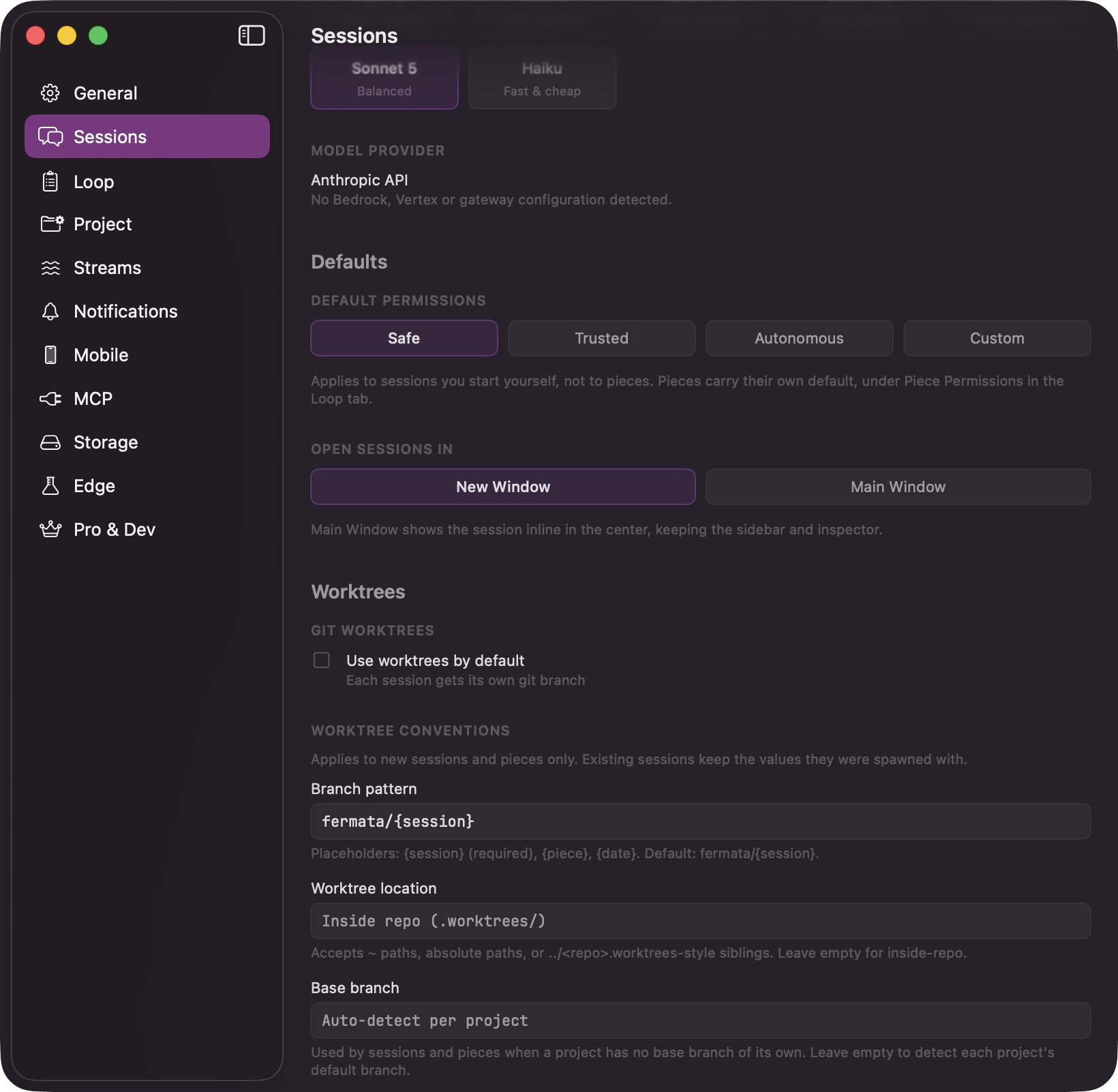
Defaults for standalone sessions, the ones you start on the Canvas. Grouped into Model, Defaults, Worktrees, and Experimental.
 | Setting | What it does |
| - | - |
| **Default Model** | The model new sessions start on. Changeable per session when you spawn it. |
| "Model Provider" | Shows the provider detected from your environment, with a **Force Anthropic API** option for anything but the direct API, and a **Re-read** button when a gateway is detected. See [Models and providers](/configuration/models). |
| **Default Permissions** | The permission profile new sessions get. Applies to sessions you start yourself, not to pieces. See [Where defaults live](/control/defaults). |
| **Open Sessions In** | "New Window" or "Main Window". Main Window shows the session inline in the center, keeping the sidebar and inspector. |
| **Use worktrees by default** | Under **Git Worktrees**. Gives every new session its own git branch. Off by default, so sessions run in your checkout unless you turn this on. |
| **Worktree Conventions** | **Branch pattern** takes `{session}` (required), `{piece}`, and `{date}`; applies to new sessions only, since pieces use their own pattern on the Loop pane. **Worktree location** and **Base branch** apply to new sessions and pieces alike. Leave **Base branch** empty to auto-detect each project's default branch. |
| **Enable experimental Agent Teams** | Under **Experimental: Agent Teams**. Lets a session spawn in-process teammates that share its worktree. Applies to every new session, requires Claude Code 2.1.32+, and uses significantly more tokens per session. |
## Loop
Defaults for pieces: the model, how hands-off a run is, and how many agents may run at once. Grouped into Model, Execution, Autonomy, Interview, and Lifecycle.
| Setting | What it does |
| - | - |
| **Default Model** | The model new sessions start on. Changeable per session when you spawn it. |
| "Model Provider" | Shows the provider detected from your environment, with a **Force Anthropic API** option for anything but the direct API, and a **Re-read** button when a gateway is detected. See [Models and providers](/configuration/models). |
| **Default Permissions** | The permission profile new sessions get. Applies to sessions you start yourself, not to pieces. See [Where defaults live](/control/defaults). |
| **Open Sessions In** | "New Window" or "Main Window". Main Window shows the session inline in the center, keeping the sidebar and inspector. |
| **Use worktrees by default** | Under **Git Worktrees**. Gives every new session its own git branch. Off by default, so sessions run in your checkout unless you turn this on. |
| **Worktree Conventions** | **Branch pattern** takes `{session}` (required), `{piece}`, and `{date}`; applies to new sessions only, since pieces use their own pattern on the Loop pane. **Worktree location** and **Base branch** apply to new sessions and pieces alike. Leave **Base branch** empty to auto-detect each project's default branch. |
| **Enable experimental Agent Teams** | Under **Experimental: Agent Teams**. Lets a session spawn in-process teammates that share its worktree. Applies to every new session, requires Claude Code 2.1.32+, and uses significantly more tokens per session. |
## Loop
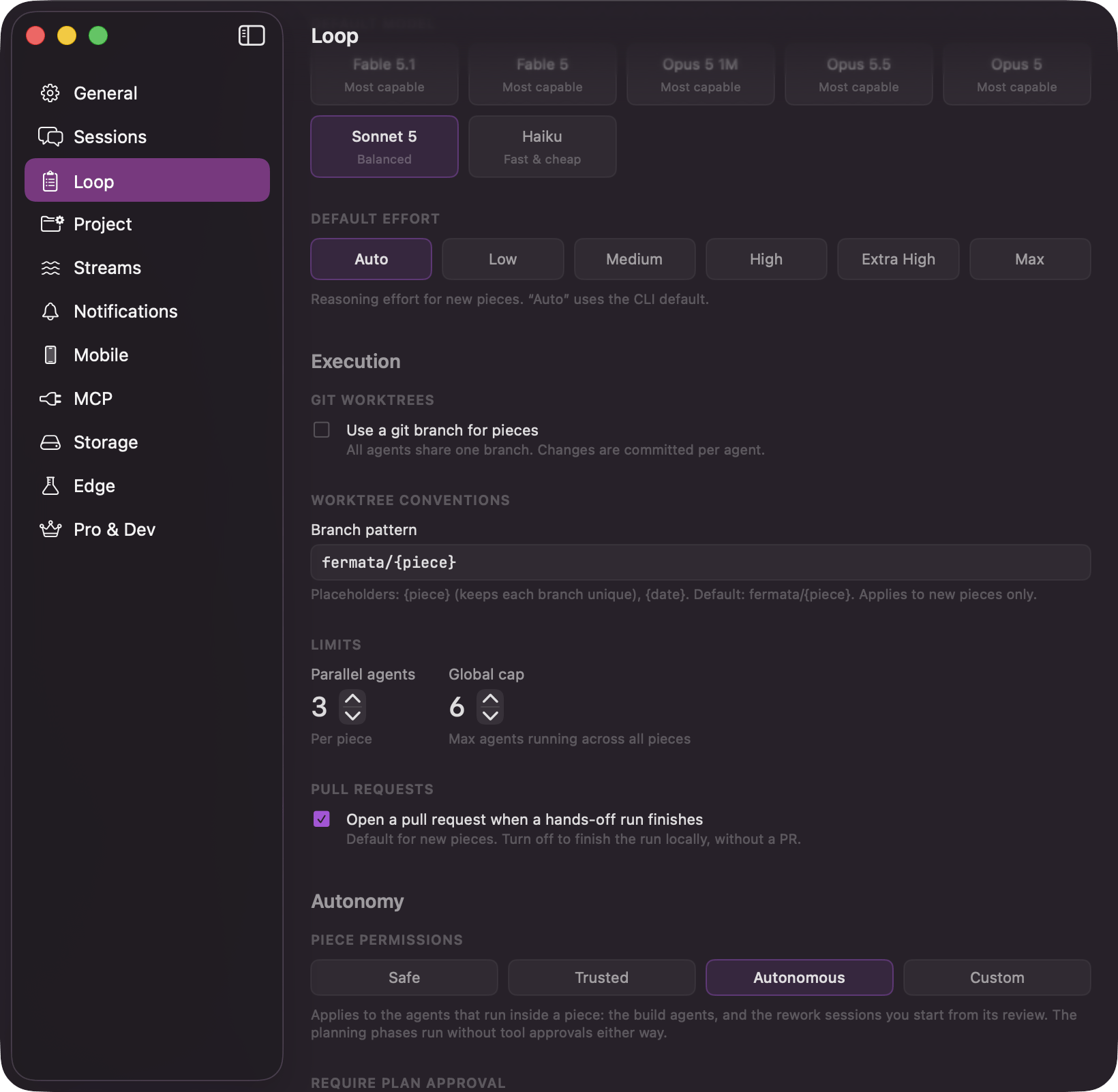
Defaults for pieces: the model, how hands-off a run is, and how many agents may run at once. Grouped into Model, Execution, Autonomy, Interview, and Lifecycle.
 | Setting | What it does |
| - | - |
| **Default Model** | The model new pieces use. Each phase can override it. |
| **Default Effort** | Reasoning effort for new pieces. "Auto" uses the CLI default. |
| **Use a git branch for pieces** | Under **Git Worktrees**. All agents on a piece share one branch, and changes are committed per agent. It only seeds a new piece's configuration and cannot turn worktrees off for a build: starting the agents creates a worktree either way, and the run refuses to start without one. |
| **Worktree Conventions** | **Branch pattern** for pieces. Takes `{piece}` and `{date}`. Applies to new pieces only. |
| **Limits** | **Parallel agents** caps a single piece. **Global cap** is the ceiling across all of them, so the Loop cannot swamp your machine. See [Limits](/loop/limits). |
| **Open a pull request when a hands-off run finishes** | Under **Pull Requests**. Turn it off to finish the run locally, without a PR. |
| **Piece Permissions** | The permission profile new pieces get. Applies to the build agents and to the rework sessions you start from a review; the planning phases run without tool approvals either way. See [Where defaults live](/control/defaults). |
| **Require Plan Approval** | Parks the run at the plan gate. See [Gates](/control/gates). The third park gate, strategy approval, has no default here; it is set per piece. |
| **Require Review Before PR** | Parks the run at review, before a pull request is opened. See [Gates](/control/gates). |
| **Run Code Review Before PR** | A pass, not a stop. Runs the code review and attaches its findings as advisory context before opening the PR. Appears only with [Edge](/configuration/edge) and its Code review switch on. |
| **Run Work Review After Agents** | A pass, on by default: "After the agents finish, one fresh agent checks that the plan was followed and the work was done, and never edits anything." See [gates](/control/gates) for what a failing verdict does. |
| **Spec Interview Depth** | How hard the interview pushes before it drafts: "Quick", "Balanced", or "Thorough". The **Project** pane overrides it per project. |
| **Automatically tear down the worktree when marked Done** | Under **Cleanup on Done**. Skips the confirmation dialog and tears the worktree down. See [what happens to the worktree](/piece/review-and-pull-request). |
| **Auto-Archive Done Pieces** | Hides finished pieces from the Done column after 14, 30, or 90 days. "Off" by default. Archiving is reversible and deletes nothing: the spec, strategy, summary, and learnings all stay. |
**Piece Permissions** is deliberately not the same control as the Sessions pane's **Default Permissions**, and it starts on a looser setting. See [how much happens without you](/control/two-layers) for why.
## Project
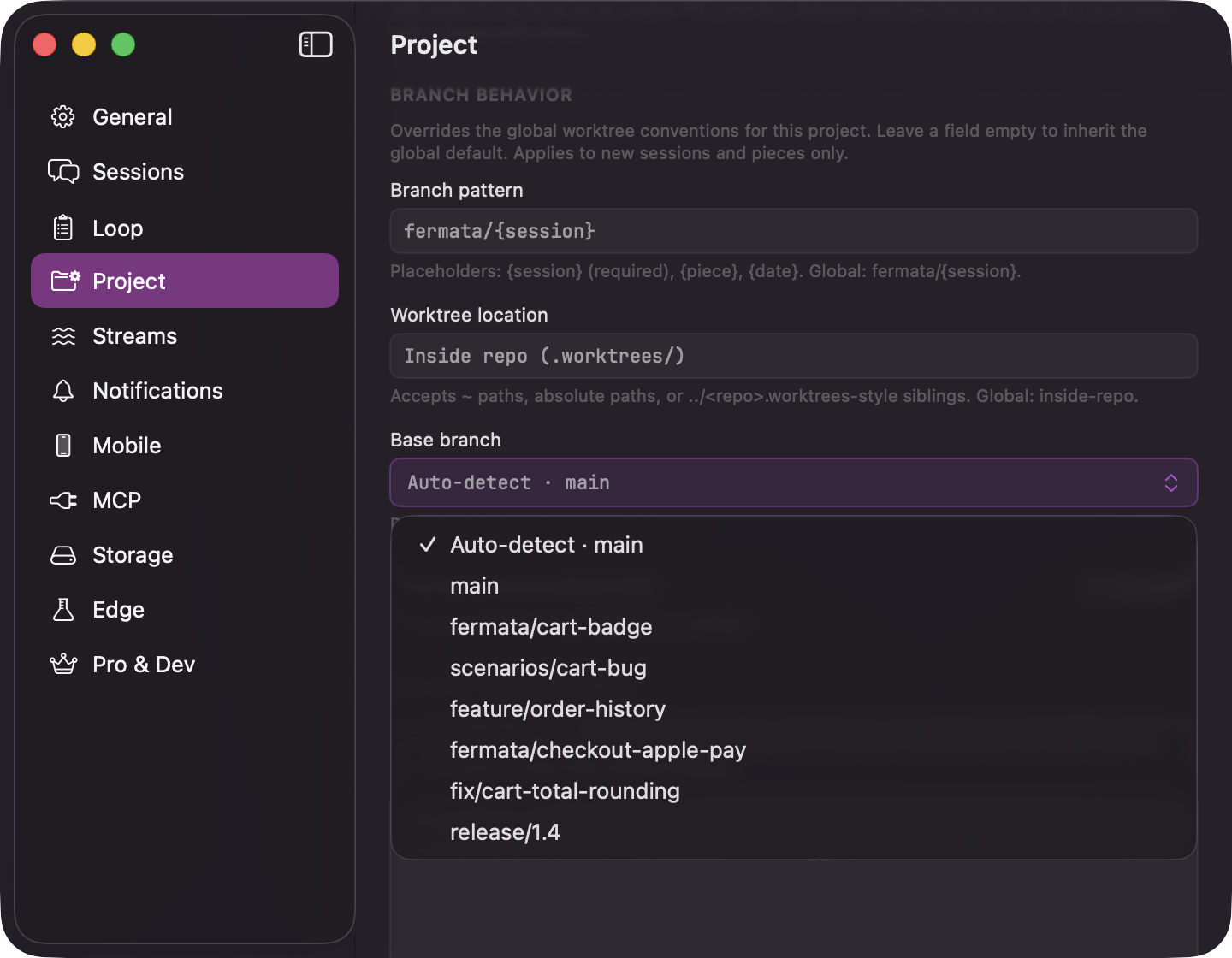
Per-project overrides. Every card inherits the global default until you switch the override on, and the card shows you what it is inheriting. The concurrency ceiling, your account, sync, and app-wide preferences stay global.
| Setting | What it does |
| - | - |
| **Default Model** | One override governing both this project's pieces and its sessions. A piece takes its model when it is created and then keeps it. |
| **Default Permissions** | The profile this project's sessions run under, inheriting from the **Sessions** pane. |
| **Piece Permissions** | The profile this project's pieces run under, inheriting from the **Loop** pane. Deliberately independent of the session override, so tightening one never moves the other. |
| **Use Worktrees by Default** | Whether this project's new sessions get their own branch. |
| **Default Effort** | Reasoning effort for this project's new pieces. |
| **Spec Interview Depth** | "Quick", "Balanced", or "Thorough". See [The interview and the spec](/piece/interview-and-spec). |
| **Auto-Archive Done Pieces** | "Off", 14, 30, or 90 days, for this project. |
| **Require Plan Approval**, **Require Review Before PR**, **Run Code Review Before PR**, **Run Work Review After Agents** | The same two gates and two passes as the Loop pane, for this project only. Code review appears only with Edge on. |
| **PR Conflict Resolution** | How Fermata brings the base branch into a PR branch when resolving conflicts. "Merge" is the safe default: no force-push, stable PR commits. "Rebase" rewrites the branch and force-pushes. |
| **Branch Behavior** | **Branch pattern** and **Worktree location** override the global default for this project; leave a field empty to inherit it. **Base branch** is a menu, not a text field: "Auto-detect · main" style, naming the repo's detected default first, then its other local branches, with a checkmark on the one in effect. A branch no longer in the repo still gets its own row, marked "missing" in red, instead of silently falling back. |
| **Claude Config Directory** | A Claude configuration folder for this project's sessions only. |
| **Project Instructions** | Standing context handed to every agent in this project. See [Project instructions](/configuration/project-instructions). |
| Setting | What it does |
| - | - |
| **Default Model** | The model new pieces use. Each phase can override it. |
| **Default Effort** | Reasoning effort for new pieces. "Auto" uses the CLI default. |
| **Use a git branch for pieces** | Under **Git Worktrees**. All agents on a piece share one branch, and changes are committed per agent. It only seeds a new piece's configuration and cannot turn worktrees off for a build: starting the agents creates a worktree either way, and the run refuses to start without one. |
| **Worktree Conventions** | **Branch pattern** for pieces. Takes `{piece}` and `{date}`. Applies to new pieces only. |
| **Limits** | **Parallel agents** caps a single piece. **Global cap** is the ceiling across all of them, so the Loop cannot swamp your machine. See [Limits](/loop/limits). |
| **Open a pull request when a hands-off run finishes** | Under **Pull Requests**. Turn it off to finish the run locally, without a PR. |
| **Piece Permissions** | The permission profile new pieces get. Applies to the build agents and to the rework sessions you start from a review; the planning phases run without tool approvals either way. See [Where defaults live](/control/defaults). |
| **Require Plan Approval** | Parks the run at the plan gate. See [Gates](/control/gates). The third park gate, strategy approval, has no default here; it is set per piece. |
| **Require Review Before PR** | Parks the run at review, before a pull request is opened. See [Gates](/control/gates). |
| **Run Code Review Before PR** | A pass, not a stop. Runs the code review and attaches its findings as advisory context before opening the PR. Appears only with [Edge](/configuration/edge) and its Code review switch on. |
| **Run Work Review After Agents** | A pass, on by default: "After the agents finish, one fresh agent checks that the plan was followed and the work was done, and never edits anything." See [gates](/control/gates) for what a failing verdict does. |
| **Spec Interview Depth** | How hard the interview pushes before it drafts: "Quick", "Balanced", or "Thorough". The **Project** pane overrides it per project. |
| **Automatically tear down the worktree when marked Done** | Under **Cleanup on Done**. Skips the confirmation dialog and tears the worktree down. See [what happens to the worktree](/piece/review-and-pull-request). |
| **Auto-Archive Done Pieces** | Hides finished pieces from the Done column after 14, 30, or 90 days. "Off" by default. Archiving is reversible and deletes nothing: the spec, strategy, summary, and learnings all stay. |
**Piece Permissions** is deliberately not the same control as the Sessions pane's **Default Permissions**, and it starts on a looser setting. See [how much happens without you](/control/two-layers) for why.
## Project
Per-project overrides. Every card inherits the global default until you switch the override on, and the card shows you what it is inheriting. The concurrency ceiling, your account, sync, and app-wide preferences stay global.
| Setting | What it does |
| - | - |
| **Default Model** | One override governing both this project's pieces and its sessions. A piece takes its model when it is created and then keeps it. |
| **Default Permissions** | The profile this project's sessions run under, inheriting from the **Sessions** pane. |
| **Piece Permissions** | The profile this project's pieces run under, inheriting from the **Loop** pane. Deliberately independent of the session override, so tightening one never moves the other. |
| **Use Worktrees by Default** | Whether this project's new sessions get their own branch. |
| **Default Effort** | Reasoning effort for this project's new pieces. |
| **Spec Interview Depth** | "Quick", "Balanced", or "Thorough". See [The interview and the spec](/piece/interview-and-spec). |
| **Auto-Archive Done Pieces** | "Off", 14, 30, or 90 days, for this project. |
| **Require Plan Approval**, **Require Review Before PR**, **Run Code Review Before PR**, **Run Work Review After Agents** | The same two gates and two passes as the Loop pane, for this project only. Code review appears only with Edge on. |
| **PR Conflict Resolution** | How Fermata brings the base branch into a PR branch when resolving conflicts. "Merge" is the safe default: no force-push, stable PR commits. "Rebase" rewrites the branch and force-pushes. |
| **Branch Behavior** | **Branch pattern** and **Worktree location** override the global default for this project; leave a field empty to inherit it. **Base branch** is a menu, not a text field: "Auto-detect · main" style, naming the repo's detected default first, then its other local branches, with a checkmark on the one in effect. A branch no longer in the repo still gets its own row, marked "missing" in red, instead of silently falling back. |
| **Claude Config Directory** | A Claude configuration folder for this project's sessions only. |
| **Project Instructions** | Standing context handed to every agent in this project. See [Project instructions](/configuration/project-instructions). |
 ## Streams
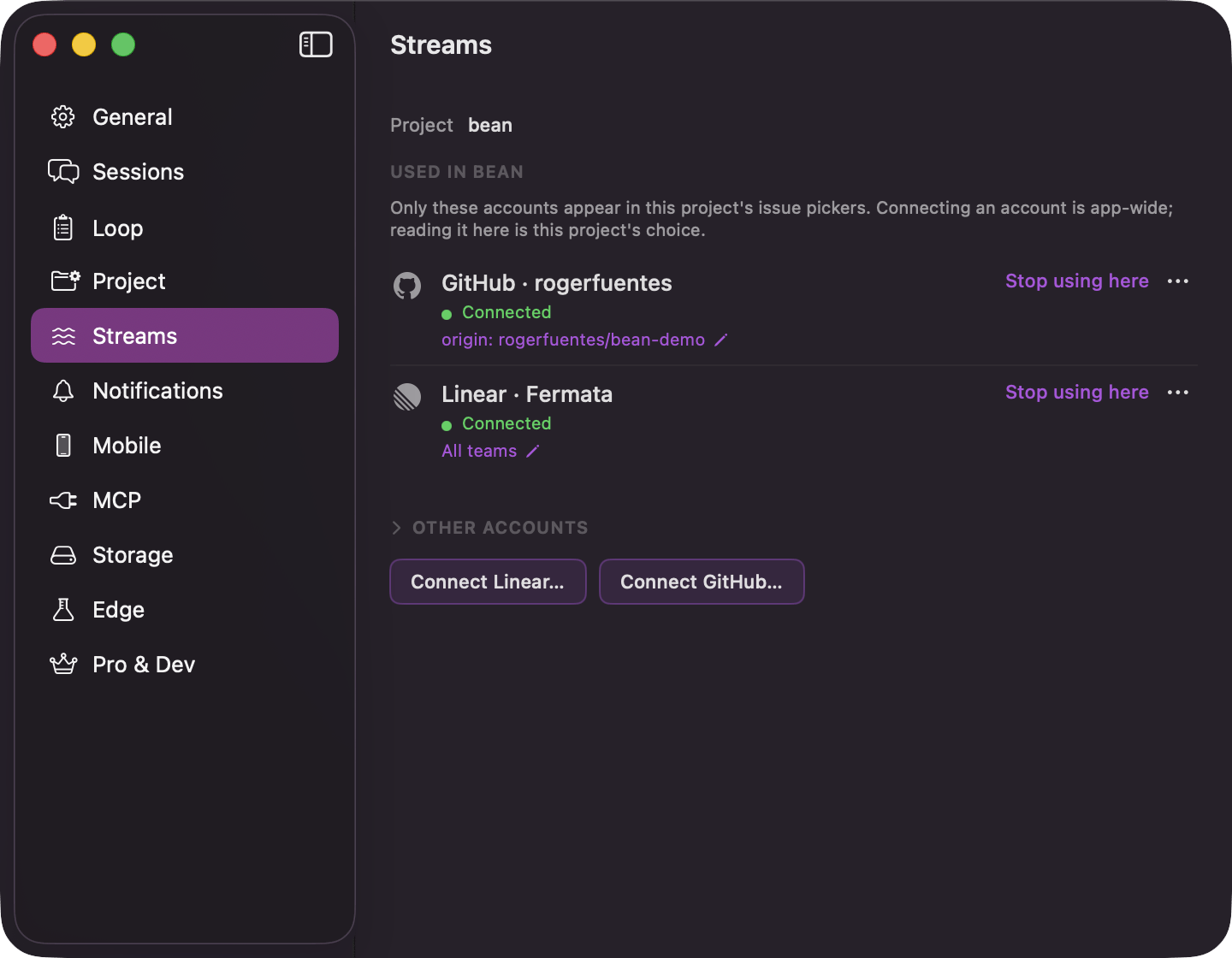
Appears only with [Edge](/configuration/edge) on and its **Loop intake** switch on.
Stream Sources are the accounts Fermata reads issues from; keys stay in your Keychain. **Connect Linear…** takes a personal API key, **Connect GitHub…** takes the logged-in `gh` account or a pasted token. Each connected source is a row naming the kind and the account it reads ("Linear · Acme", "GitHub · octocat") with a health line, a **Check now** button, and **Remove**. See [Starting from an issue](/loop/from-an-issue) for the picker this feeds.
## Streams
Appears only with [Edge](/configuration/edge) on and its **Loop intake** switch on.
Stream Sources are the accounts Fermata reads issues from; keys stay in your Keychain. **Connect Linear…** takes a personal API key, **Connect GitHub…** takes the logged-in `gh` account or a pasted token. Each connected source is a row naming the kind and the account it reads ("Linear · Acme", "GitHub · octocat") with a health line, a **Check now** button, and **Remove**. See [Starting from an issue](/loop/from-an-issue) for the picker this feeds.
 ## Notifications
| Setting | What it does |
| - | - |
| **Required Input** | Approvals and agent questions. The one to leave on. |
| **Session Completed** | Sessions that finish successfully. |
| **Failures** | Failed sessions, pull requests, and planning steps. Split out from completions deliberately, so muting the chatter never mutes the one thing that has to get through. |
| **SDD Phases** | Subtitled "Piece phase transitions". Notifies as a piece moves between phases. |
| **Play sound with notifications** | Adds a sound to all of the above. |
## Mobile
Appears once the companion is available to your account.
Pairing for the phone companion: **Generate Pairing QR Code**, then scan it from the phone. Once paired, the pane shows the device name, live sync health, an "End-to-end encrypted" confirmation, and **Unpair**. See [The phone companion](/mobile/companion).
## MCP
Appears only with Edge on and its **MCP control plane** switch on. Turning either off shuts a running server down.
| Setting | What it does |
| - | - |
| **Fermata MCP server** | Lets an external Claude Code drive pieces over a local MCP connection. Off by default. |
Turning the server on adds a **Preferred Port** field, defaulting to 8787: type a port and press **Apply**. Fermata tries that port first, then the next nine, then whatever the system offers; a port change takes effect at the next start or **Retry**, never underneath a call already in flight.
Once the server is running, the pane shows the bound host and port, a health readout, and whether Claude Code currently has the server registered. Connection instructions switch between three tabs: **One-off** (a command for a single session), **Shell alias** (an alias line for your shell config), and **Register** (the entry Fermata writes into Claude Code so every `claude` session sees it without a flag); each tab carries a **Copy Instructions** and a **Copy Inline Config** button.
Below the instructions, **Register** and **Unregister** write and remove that Claude Code entry, and **Regenerate Token** retires the connection token: every client holding the old URL stops working, including a session connected right now, which has to be started again. See [Filing work from outside](/loop/filing-work-from-outside).
## Storage
| Setting | What it does |
| - | - |
| **Auto-Save** | How often session state is written to disk: 15s, 30s, or 60s. |
| **Keep full history for** | Retention before old sessions compress to a summary: "1 day", "7 days", "14 days", or "Forever". Compression is permanent. Sessions stay visible either way; pin one from its context menu to keep its full history regardless of age. |
| **Include subagent transcripts** | Keeps subagent messages alongside the parent session. Costs disk, buys you the full picture later. |
## Edge
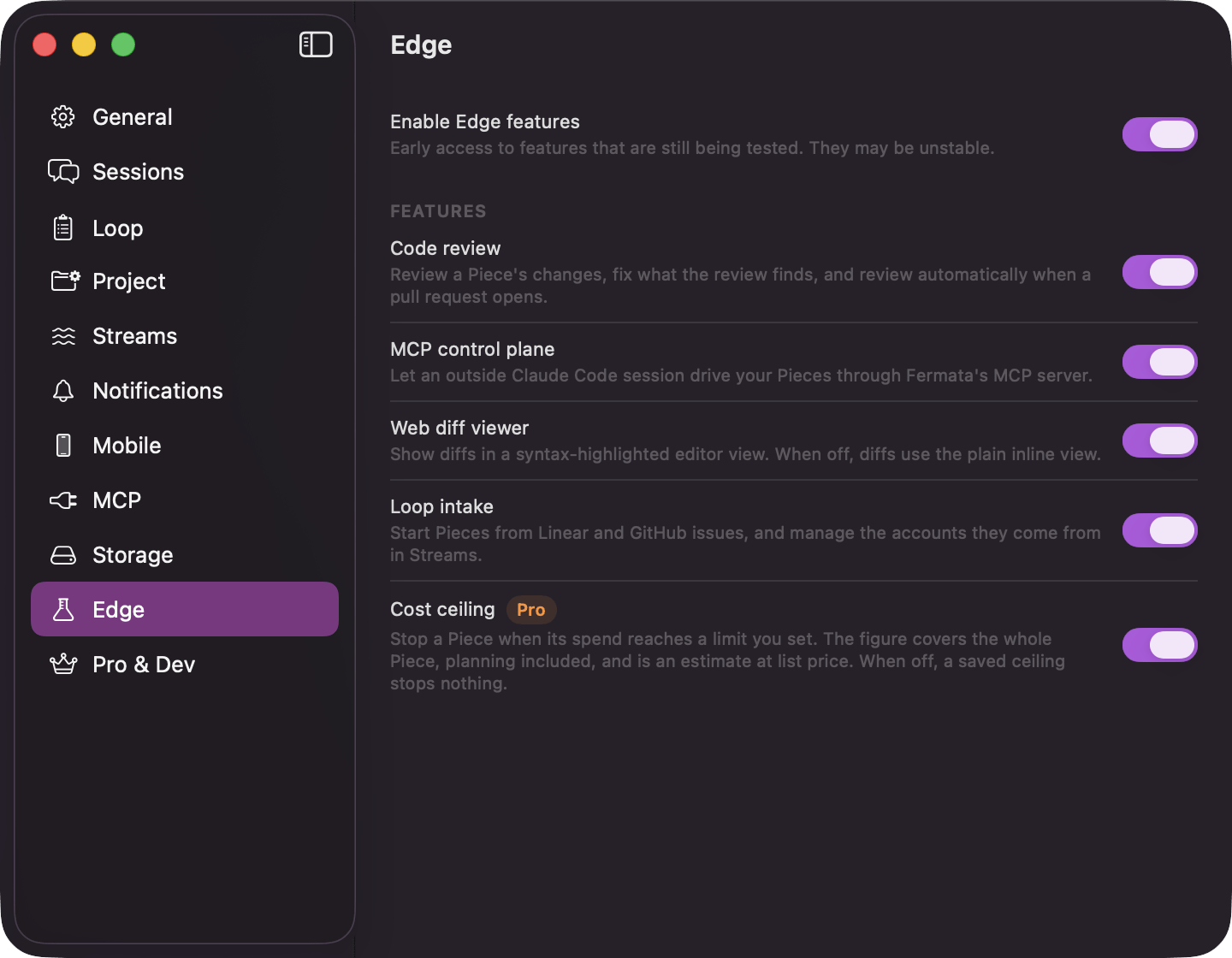
The channel switch, **Enable Edge features**, and a "Features" card with one switch per preview feature: **Code review**, **MCP control plane**, **Web diff viewer**, **Loop intake**, and **Cost ceiling**. See [Edge features](/configuration/edge).
## Notifications
| Setting | What it does |
| - | - |
| **Required Input** | Approvals and agent questions. The one to leave on. |
| **Session Completed** | Sessions that finish successfully. |
| **Failures** | Failed sessions, pull requests, and planning steps. Split out from completions deliberately, so muting the chatter never mutes the one thing that has to get through. |
| **SDD Phases** | Subtitled "Piece phase transitions". Notifies as a piece moves between phases. |
| **Play sound with notifications** | Adds a sound to all of the above. |
## Mobile
Appears once the companion is available to your account.
Pairing for the phone companion: **Generate Pairing QR Code**, then scan it from the phone. Once paired, the pane shows the device name, live sync health, an "End-to-end encrypted" confirmation, and **Unpair**. See [The phone companion](/mobile/companion).
## MCP
Appears only with Edge on and its **MCP control plane** switch on. Turning either off shuts a running server down.
| Setting | What it does |
| - | - |
| **Fermata MCP server** | Lets an external Claude Code drive pieces over a local MCP connection. Off by default. |
Turning the server on adds a **Preferred Port** field, defaulting to 8787: type a port and press **Apply**. Fermata tries that port first, then the next nine, then whatever the system offers; a port change takes effect at the next start or **Retry**, never underneath a call already in flight.
Once the server is running, the pane shows the bound host and port, a health readout, and whether Claude Code currently has the server registered. Connection instructions switch between three tabs: **One-off** (a command for a single session), **Shell alias** (an alias line for your shell config), and **Register** (the entry Fermata writes into Claude Code so every `claude` session sees it without a flag); each tab carries a **Copy Instructions** and a **Copy Inline Config** button.
Below the instructions, **Register** and **Unregister** write and remove that Claude Code entry, and **Regenerate Token** retires the connection token: every client holding the old URL stops working, including a session connected right now, which has to be started again. See [Filing work from outside](/loop/filing-work-from-outside).
## Storage
| Setting | What it does |
| - | - |
| **Auto-Save** | How often session state is written to disk: 15s, 30s, or 60s. |
| **Keep full history for** | Retention before old sessions compress to a summary: "1 day", "7 days", "14 days", or "Forever". Compression is permanent. Sessions stay visible either way; pin one from its context menu to keep its full history regardless of age. |
| **Include subagent transcripts** | Keeps subagent messages alongside the parent session. Costs disk, buys you the full picture later. |
## Edge
The channel switch, **Enable Edge features**, and a "Features" card with one switch per preview feature: **Code review**, **MCP control plane**, **Web diff viewer**, **Loop intake**, and **Cost ceiling**. See [Edge features](/configuration/edge).
 ## Pro & Dev
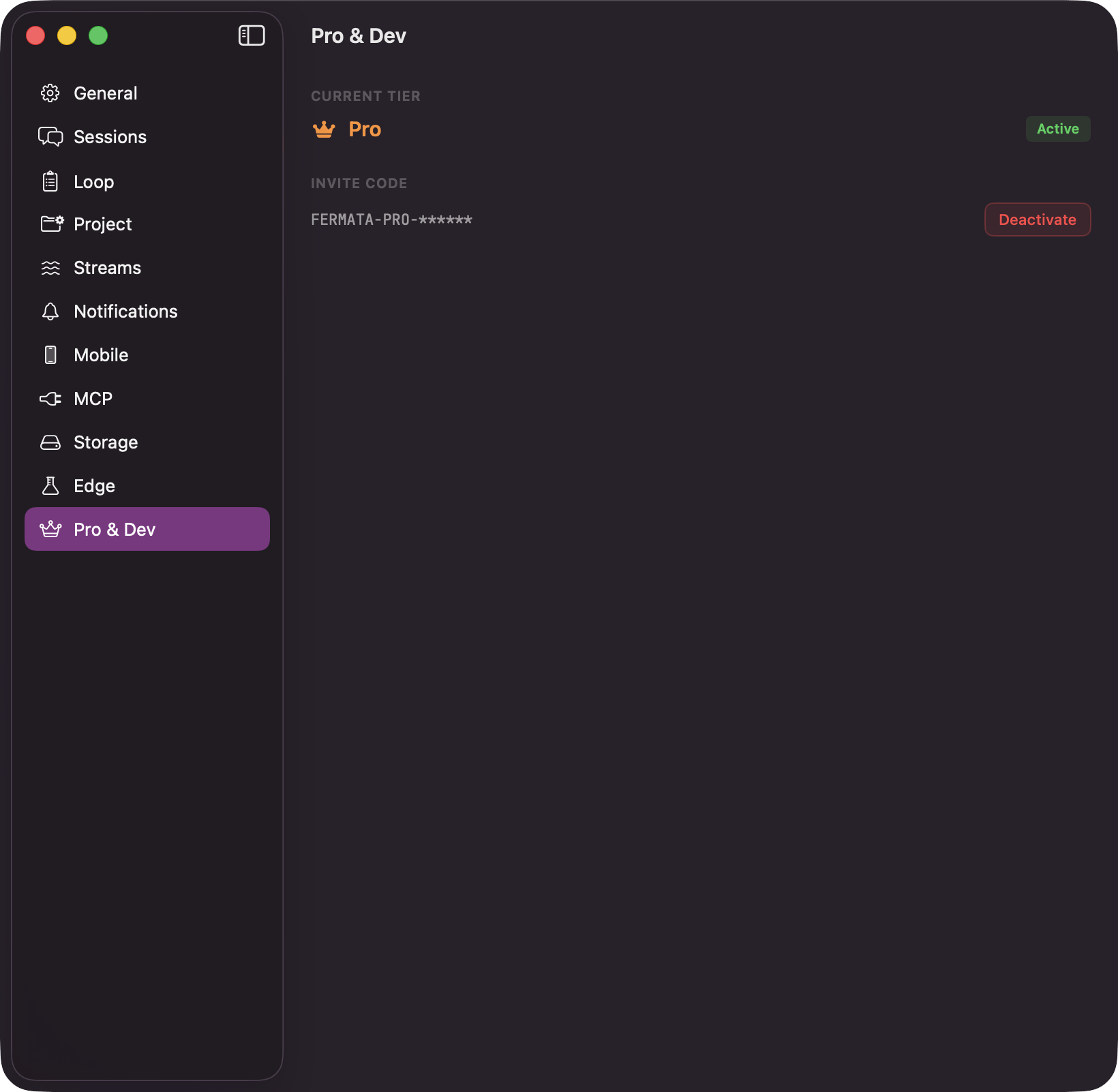
"Current Tier" reads "Free" or "Pro". Free is the whole desktop app, and nothing here is required for normal use. Pro is unlocked by an "Invite Code" during the phone companion's beta. It turns on the companion and the sync it runs over, the spend insights cards on [Analytics](/reference/analytics), and the cost ceiling behind [Edge](/configuration/edge). See [the phone companion](/mobile/companion).
The Edge switch is not here. It has its own pane, described on [Edge features](/configuration/edge).
## Pro & Dev
"Current Tier" reads "Free" or "Pro". Free is the whole desktop app, and nothing here is required for normal use. Pro is unlocked by an "Invite Code" during the phone companion's beta. It turns on the companion and the sync it runs over, the spend insights cards on [Analytics](/reference/analytics), and the cost ceiling behind [Edge](/configuration/edge). See [the phone companion](/mobile/companion).
The Edge switch is not here. It has its own pane, described on [Edge features](/configuration/edge).