> ## Documentation Index
> Fetch the complete documentation index at: https://docs.fermata.run/llms.txt
> Use this file to discover all available pages before exploring further.
# Permission profiles and approvals
> What agents may do without asking, and what happens when they have to ask.
This is layer two of [the two layers](/control/two-layers): what an agent may do without asking you. The [lane](/control/lanes) and the [gates](/control/gates) answer a different question, how far the piece advances, and neither one changes what you read here.
The permission profile decides which tool calls go through unattended. Anything it does not cover raises an approval card, and the agent waits.
## The four profiles
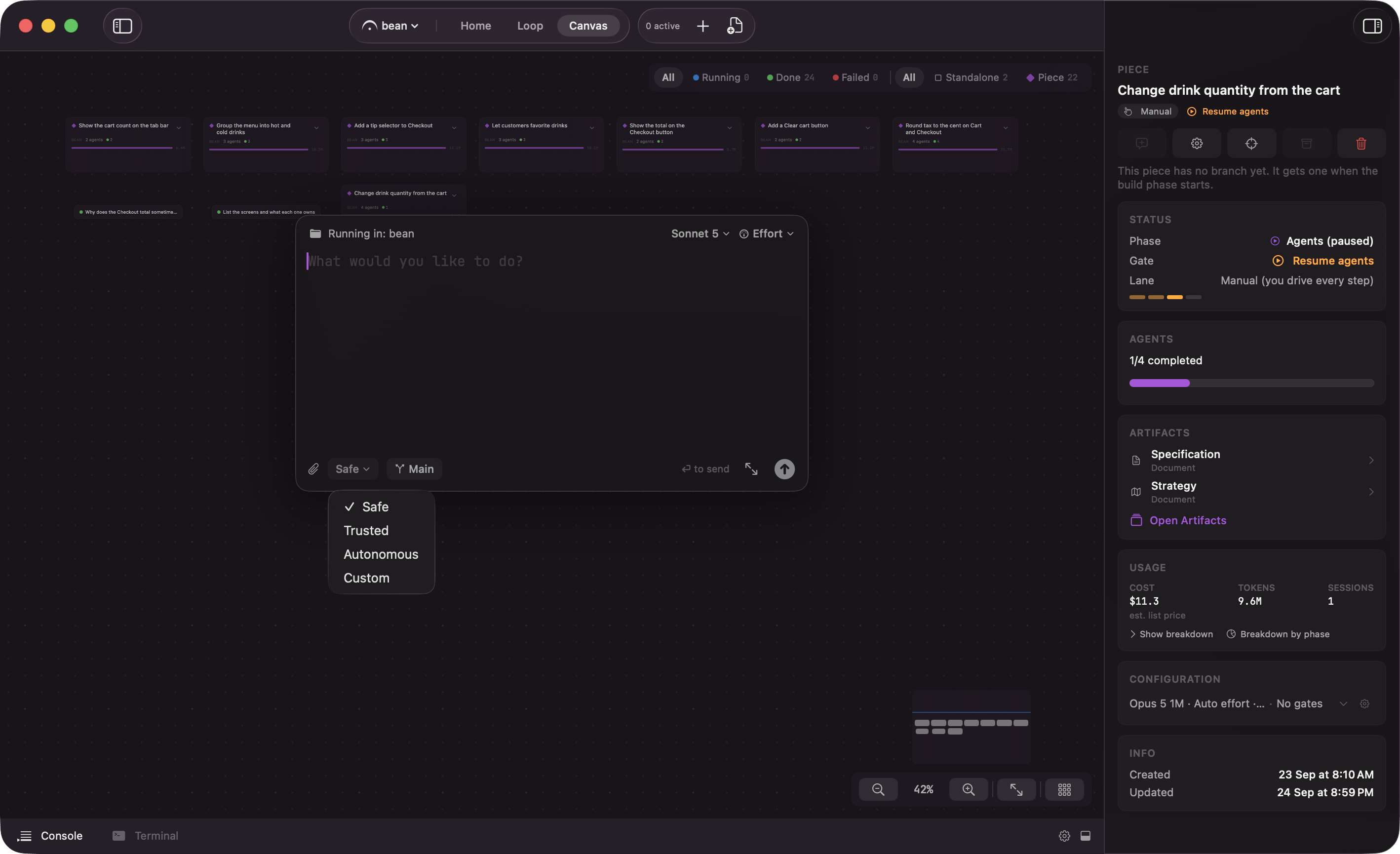 | Profile | Description in the app | When to reach for it |
| - | - | - |
| **Safe** | All actions require approval | You are learning what a run involves, or the work touches something you cannot afford to get wrong. |
| **Trusted** | Auto-approve file writes | The work is mostly editing code and you do not want a card for every edit, but you still want to see every command. |
| **Autonomous** | Auto-approve writes + bash | You trust the work: a clean refactor, a well specced feature, anything you cannot babysit one approval at a time. |
| **Custom** | Configure manually | None of the three quite fits and you want to set the rules by hand. |
Reads, globs, and greps are allowed under every profile, so you will never be asked about them.
## The two defaults
A piece defaults to **Autonomous**. A standalone session defaults to **Safe**. The reasoning is in [the two layers](/control/two-layers): a piece's agents work inside the piece's own worktree and branch, so a bad edit is bounded by something nobody has merged, while a standalone session may be pointed at your working copy.
Two things hold in every profile.
**A piece's planning phases never raise tool approvals at all.** The interview, the spec, the strategy, and the decomposition read your codebase and write documents, which is most of the time you spend inside a piece and why pieces can feel like they never prompt. The Agents phase is where the profile starts to matter.
**No profile allows publishing.** Agents never push. `git push` and `gh pr merge` are refused for any session working in a piece's branch, ahead of every allow rule and even a human Allow, and the denial carries a reason telling the agent to commit and stop. Fermata does the pushing, and only when you click: **Create PR**, **Push to PR** on later commits, and the force-push it uses to resolve a pull request conflict when the project is set to Rebase. Fermata never merges. You merge.
You set the profile per piece under **Permission Profile** in the Flow Configuration sheet, reachable with **Configure Piece** in the piece inspector. Changing it mid-run is allowed, and the sheet says what that means: "Applies to agents that have not started yet. Agents already running keep the profile they were spawned with."
## The approval card
When an agent reaches for a tool its profile does not cover, it pauses mid-turn and a card appears, badged "Approval Required". The card names the tool, the file path or command it is aimed at, and a preview of what it would run.
| Profile | Description in the app | When to reach for it |
| - | - | - |
| **Safe** | All actions require approval | You are learning what a run involves, or the work touches something you cannot afford to get wrong. |
| **Trusted** | Auto-approve file writes | The work is mostly editing code and you do not want a card for every edit, but you still want to see every command. |
| **Autonomous** | Auto-approve writes + bash | You trust the work: a clean refactor, a well specced feature, anything you cannot babysit one approval at a time. |
| **Custom** | Configure manually | None of the three quite fits and you want to set the rules by hand. |
Reads, globs, and greps are allowed under every profile, so you will never be asked about them.
## The two defaults
A piece defaults to **Autonomous**. A standalone session defaults to **Safe**. The reasoning is in [the two layers](/control/two-layers): a piece's agents work inside the piece's own worktree and branch, so a bad edit is bounded by something nobody has merged, while a standalone session may be pointed at your working copy.
Two things hold in every profile.
**A piece's planning phases never raise tool approvals at all.** The interview, the spec, the strategy, and the decomposition read your codebase and write documents, which is most of the time you spend inside a piece and why pieces can feel like they never prompt. The Agents phase is where the profile starts to matter.
**No profile allows publishing.** Agents never push. `git push` and `gh pr merge` are refused for any session working in a piece's branch, ahead of every allow rule and even a human Allow, and the denial carries a reason telling the agent to commit and stop. Fermata does the pushing, and only when you click: **Create PR**, **Push to PR** on later commits, and the force-push it uses to resolve a pull request conflict when the project is set to Rebase. Fermata never merges. You merge.
You set the profile per piece under **Permission Profile** in the Flow Configuration sheet, reachable with **Configure Piece** in the piece inspector. Changing it mid-run is allowed, and the sheet says what that means: "Applies to agents that have not started yet. Agents already running keep the profile they were spawned with."
## The approval card
When an agent reaches for a tool its profile does not cover, it pauses mid-turn and a card appears, badged "Approval Required". The card names the tool, the file path or command it is aimed at, and a preview of what it would run.
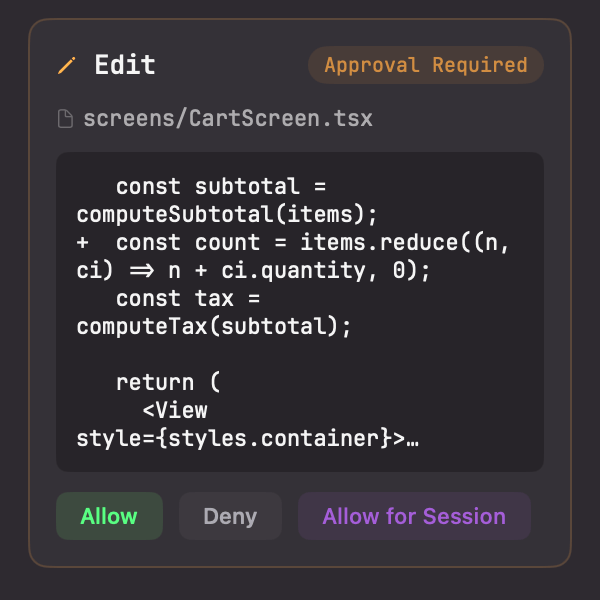 You have four answers, and the fourth appears only inside a piece.
* **Allow.** Run this one call. Ask again next time.
* **Deny.** Block it. The first press opens a **Reason (optional)** field and the second submits, so you can tell the agent what to do instead rather than just stopping it.
* **Allow for Session.** Auto-approve this exact tool for the rest of this session.
* **Allow for Piece.** Auto-approve this tool for the whole piece, so every later session the piece starts inherits the grant instead of asking again.
Deny is the redirect, not the kill switch. The reason goes back to the agent and it picks a different approach.
**Allow for Session** is the in-session escape hatch from a strict profile. It is worth a second thought on `bash`, where it allows every later command in that session, not just this one.
**Allow for Piece** has a longer reach, and it is visible and reversible. Standing grants show as an "Allowed tools" row in the piece inspector, with a **Clear allowed tools** button: "Stop auto-approving these tools. Agents already running keep the tools they started with."
## Where cards appear
The same card renders in four places, and answering it anywhere resolves it everywhere:
* In the session's transcript, inline where the agent stopped.
* In the session inspector on the right.
* On [Home](/surfaces/home), in the band of sessions waiting on a tool approval, beside the parked gates.
* On the phone, as an "APPROVAL REQUIRED" card with **Allow**, **Deny**, and **Allow for Session**. See [the phone companion](/mobile/companion).
The card waits. The agent stays blocked until you answer, and Fermata never expires it. The Claude Code hook holding the call open does have a limit: it is registered for 24 hours, and after that the CLI stops waiting and carries on as if the hook did not exist. [The two layers](/control/two-layers) has that rule in full. One thing does resolve it implicitly: typing a follow-up message into a session that has a card open denies the card first, with a fixed reason, so your instruction is what the agent acts on next.
## An agent's own MCP calls
An agent inside Fermata calling out to an MCP server you configured rides the profile like anything else. The tool is not on any profile's allow list, so on **Safe**, **Trusted**, and **Custom** it raises a card and waits. On **Autonomous** it goes through unattended, in the same tier as `bash`, because that profile's safety rests on the worktree rather than on reviewing each call. If you want those calls surfaced, run the piece on **Trusted**.
Calls in the other direction, from an outside agent into Fermata, never ride the profile. See [filing work from outside](/loop/filing-work-from-outside).
Profiles can be set per piece, per project, and in Settings. See [where defaults live](/control/defaults).
You have four answers, and the fourth appears only inside a piece.
* **Allow.** Run this one call. Ask again next time.
* **Deny.** Block it. The first press opens a **Reason (optional)** field and the second submits, so you can tell the agent what to do instead rather than just stopping it.
* **Allow for Session.** Auto-approve this exact tool for the rest of this session.
* **Allow for Piece.** Auto-approve this tool for the whole piece, so every later session the piece starts inherits the grant instead of asking again.
Deny is the redirect, not the kill switch. The reason goes back to the agent and it picks a different approach.
**Allow for Session** is the in-session escape hatch from a strict profile. It is worth a second thought on `bash`, where it allows every later command in that session, not just this one.
**Allow for Piece** has a longer reach, and it is visible and reversible. Standing grants show as an "Allowed tools" row in the piece inspector, with a **Clear allowed tools** button: "Stop auto-approving these tools. Agents already running keep the tools they started with."
## Where cards appear
The same card renders in four places, and answering it anywhere resolves it everywhere:
* In the session's transcript, inline where the agent stopped.
* In the session inspector on the right.
* On [Home](/surfaces/home), in the band of sessions waiting on a tool approval, beside the parked gates.
* On the phone, as an "APPROVAL REQUIRED" card with **Allow**, **Deny**, and **Allow for Session**. See [the phone companion](/mobile/companion).
The card waits. The agent stays blocked until you answer, and Fermata never expires it. The Claude Code hook holding the call open does have a limit: it is registered for 24 hours, and after that the CLI stops waiting and carries on as if the hook did not exist. [The two layers](/control/two-layers) has that rule in full. One thing does resolve it implicitly: typing a follow-up message into a session that has a card open denies the card first, with a fixed reason, so your instruction is what the agent acts on next.
## An agent's own MCP calls
An agent inside Fermata calling out to an MCP server you configured rides the profile like anything else. The tool is not on any profile's allow list, so on **Safe**, **Trusted**, and **Custom** it raises a card and waits. On **Autonomous** it goes through unattended, in the same tier as `bash`, because that profile's safety rests on the worktree rather than on reviewing each call. If you want those calls surfaced, run the piece on **Trusted**.
Calls in the other direction, from an outside agent into Fermata, never ride the profile. See [filing work from outside](/loop/filing-work-from-outside).
Profiles can be set per piece, per project, and in Settings. See [where defaults live](/control/defaults).