> ## Documentation Index
> Fetch the complete documentation index at: https://docs.fermata.run/llms.txt
> Use this file to discover all available pages before exploring further.
# The two layers
> Two layers of control: how far a piece advances on its own, and what agents may do without asking.
Two different questions decide how much happens without you, and Fermata answers them with two separate controls. Mixing them up is the single most common source of confusion, so it is worth naming them apart.
**How far does a piece advance without me?** That is the lane plus the gates. The lane is what fermata.run calls the leash: Manual, Auto, or Loop. The gates are the stops you can add back into a lane that would otherwise keep going, and beside them sit two review passes and the switch that picks the ending. See [lanes](/control/lanes) and [gates](/control/gates).
**What may agents do without asking?** That is the permission profile plus the approval cards. The profile decides which tool calls go through unattended. Anything the profile does not cover raises a card and the agent waits for you. See [permission profiles and approvals](/control/permissions-and-approvals).
The two are independent. Putting a piece on the hands-off Loop lane does not loosen its permission profile, and tightening the profile to **Safe** does not stop the piece from advancing between phases.
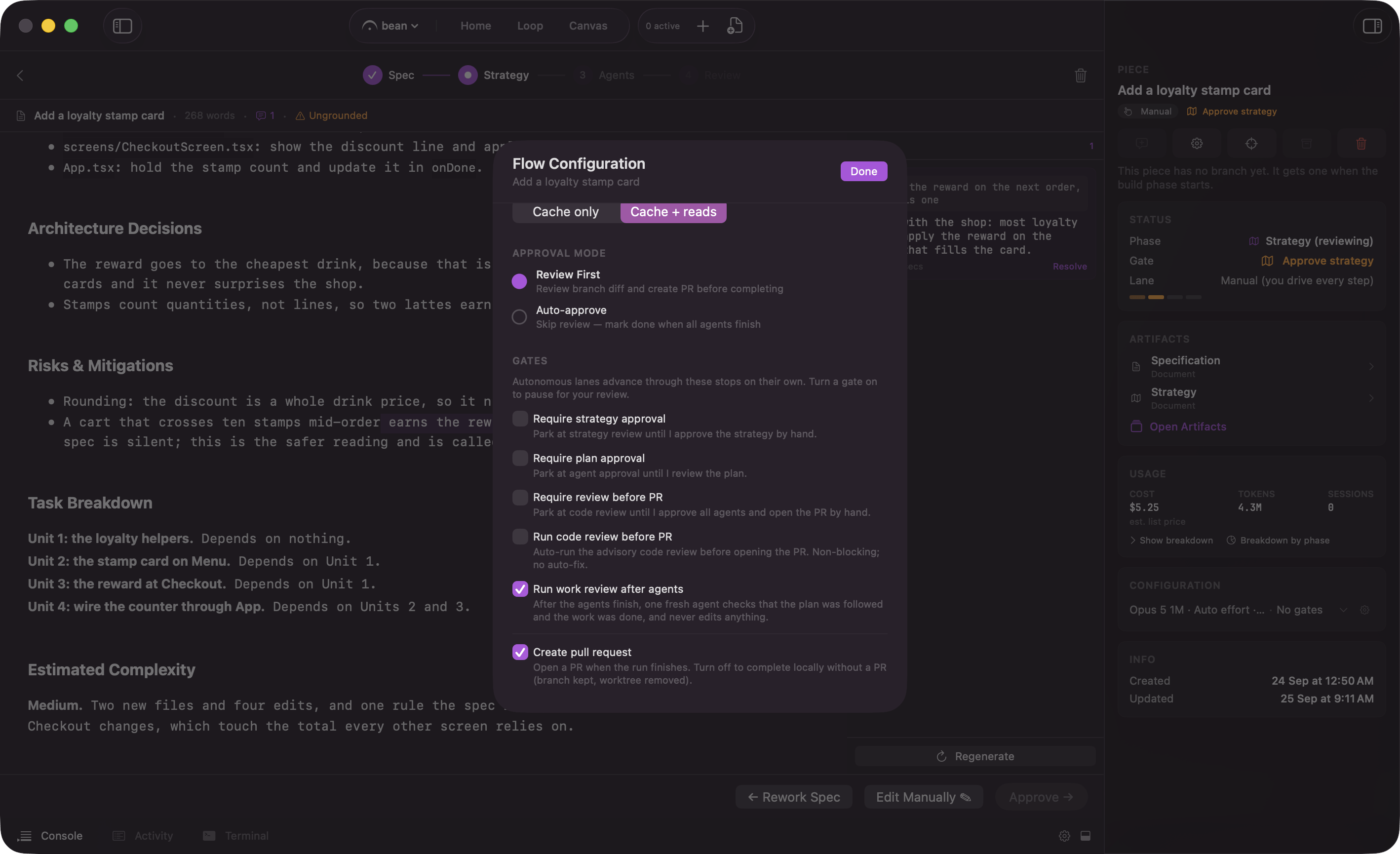 ## The defaults, side by side
The two defaults point in opposite directions, on purpose.
| | A piece | A standalone session |
| - | - | - |
| **Lane** | Manual when you start a piece, Loop for a Backlog draft. | Not applicable. A session is one prompt, not a four-phase run. |
| **Gates** | All three off. | Not applicable. |
| **Passes** | **Run work review after agents** on. **Run code review before PR** off, and shown only on Edge. | Not applicable. |
| **Ending** | **Create pull request** on. | Not applicable. |
| **Permission profile** | **Autonomous**. Writes and `bash` run without asking. | **Safe**. Every action asks first. |
A piece looks permissive at the tool level and conservative at the phase level. A standalone session is the reverse.
The reason is containment. A piece's agents work in the piece's own git worktree and branch, never in your checkout, so a bad edit there is bounded by a branch nobody has merged. You can read it, rewrite it, or throw the branch away. A standalone session may be pointed at your working copy, where a bad edit is not bounded by anything, so it asks first.
Neither default lets an agent publish. See [permission profiles and approvals](/control/permissions-and-approvals) for the rule and where it sits. Fermata opens the pull request itself at Review, and you merge.
## What happens if you do nothing
No default fires when you look away, and only one thing has a clock on it.
* **A parked piece waits.** It stops at the gate, keeps its worktree and its branch, and shows up in "Needs You" on [Home](/surfaces/home), in the counter on the [Loop board](/loop/board), in the "Gate" row of its inspector, and in the menu bar. It stays there until you answer.
* **A pending tool approval blocks that session.** The agent is mid-turn and stays mid-turn. Other sessions and other pieces are unaffected. This is the one wait with a limit: the Claude Code hook that holds the call open is registered for 24 hours, and after that the CLI stops waiting for the answer and carries on as if the hook did not exist.
* **An MCP confirmation waits too.** When an outside agent asks for one of the actions that start, stop, or finish work, the confirmation card parks until you answer it. Fermata puts no timeout on it; only the calling client's own clock can give up.
Doing nothing is a valid answer at a gate. The run just does not move.
## The exception: an outside agent driving your work
One thing always asks, whatever the profile says. When an external Claude Code drives your pieces over Fermata's MCP server, the actions that start, stop, or finish work raise a confirmation on your Mac first. See [filing work from outside](/loop/filing-work-from-outside) for the seven of them.
## Where to change each
| What you want to change | Where |
| - | - |
| The lane this one piece runs in | At spec approval, or from the badge on its card. See [lanes](/control/lanes). |
| Where this one piece stops anyway | The **Gates** section of the Flow Configuration sheet, opened with **Configure Piece** in the piece inspector. See [gates](/control/gates). |
| What this piece's agents may do | **Permission Profile** in that same sheet. See [permission profiles and approvals](/control/permissions-and-approvals). |
| What a standalone session may do | The profile picker in the spawn overlay, or the app default. |
| The starting point for everything new | Per project or in Settings. See [where defaults live](/control/defaults). |
## The defaults, side by side
The two defaults point in opposite directions, on purpose.
| | A piece | A standalone session |
| - | - | - |
| **Lane** | Manual when you start a piece, Loop for a Backlog draft. | Not applicable. A session is one prompt, not a four-phase run. |
| **Gates** | All three off. | Not applicable. |
| **Passes** | **Run work review after agents** on. **Run code review before PR** off, and shown only on Edge. | Not applicable. |
| **Ending** | **Create pull request** on. | Not applicable. |
| **Permission profile** | **Autonomous**. Writes and `bash` run without asking. | **Safe**. Every action asks first. |
A piece looks permissive at the tool level and conservative at the phase level. A standalone session is the reverse.
The reason is containment. A piece's agents work in the piece's own git worktree and branch, never in your checkout, so a bad edit there is bounded by a branch nobody has merged. You can read it, rewrite it, or throw the branch away. A standalone session may be pointed at your working copy, where a bad edit is not bounded by anything, so it asks first.
Neither default lets an agent publish. See [permission profiles and approvals](/control/permissions-and-approvals) for the rule and where it sits. Fermata opens the pull request itself at Review, and you merge.
## What happens if you do nothing
No default fires when you look away, and only one thing has a clock on it.
* **A parked piece waits.** It stops at the gate, keeps its worktree and its branch, and shows up in "Needs You" on [Home](/surfaces/home), in the counter on the [Loop board](/loop/board), in the "Gate" row of its inspector, and in the menu bar. It stays there until you answer.
* **A pending tool approval blocks that session.** The agent is mid-turn and stays mid-turn. Other sessions and other pieces are unaffected. This is the one wait with a limit: the Claude Code hook that holds the call open is registered for 24 hours, and after that the CLI stops waiting for the answer and carries on as if the hook did not exist.
* **An MCP confirmation waits too.** When an outside agent asks for one of the actions that start, stop, or finish work, the confirmation card parks until you answer it. Fermata puts no timeout on it; only the calling client's own clock can give up.
Doing nothing is a valid answer at a gate. The run just does not move.
## The exception: an outside agent driving your work
One thing always asks, whatever the profile says. When an external Claude Code drives your pieces over Fermata's MCP server, the actions that start, stop, or finish work raise a confirmation on your Mac first. See [filing work from outside](/loop/filing-work-from-outside) for the seven of them.
## Where to change each
| What you want to change | Where |
| - | - |
| The lane this one piece runs in | At spec approval, or from the badge on its card. See [lanes](/control/lanes). |
| Where this one piece stops anyway | The **Gates** section of the Flow Configuration sheet, opened with **Configure Piece** in the piece inspector. See [gates](/control/gates). |
| What this piece's agents may do | **Permission Profile** in that same sheet. See [permission profiles and approvals](/control/permissions-and-approvals). |
| What a standalone session may do | The profile picker in the spawn overlay, or the app default. |
| The starting point for everything new | Per project or in Settings. See [where defaults live](/control/defaults). |