> ## Documentation Index
> Fetch the complete documentation index at: https://docs.fermata.run/llms.txt
> Use this file to discover all available pages before exploring further.
# Filing work from outside
> Expose Fermata as an MCP server so a Claude Code session in your terminal can read and drive your pieces.
Fermata already runs your own Claude, so the MCP servers you have configured work inside Fermata sessions with no setup. This points the other way: it turns Fermata itself into an MCP server. A Claude Code session in your terminal can then list your projects, read a piece's spec and agent graph, file drafts into your Backlog, answer interview questions, and drive a run from Spec to an opened pull request.
The practical use is staying in the terminal. Ask what needs you without switching windows, start a piece from wherever you already are, or let an agent outside Fermata check on a run it started.
This is an Edge preview, off by default. See [Edge features](/configuration/edge) for what that means and how to turn it on.
 ## Turn it on
Settings → Edge, then **Enable Edge features** and, in the "Features" card, **MCP control plane**. The **MCP** pane appears in Settings once both are on. Turning either switch off hides the pane again and shuts a running server down.
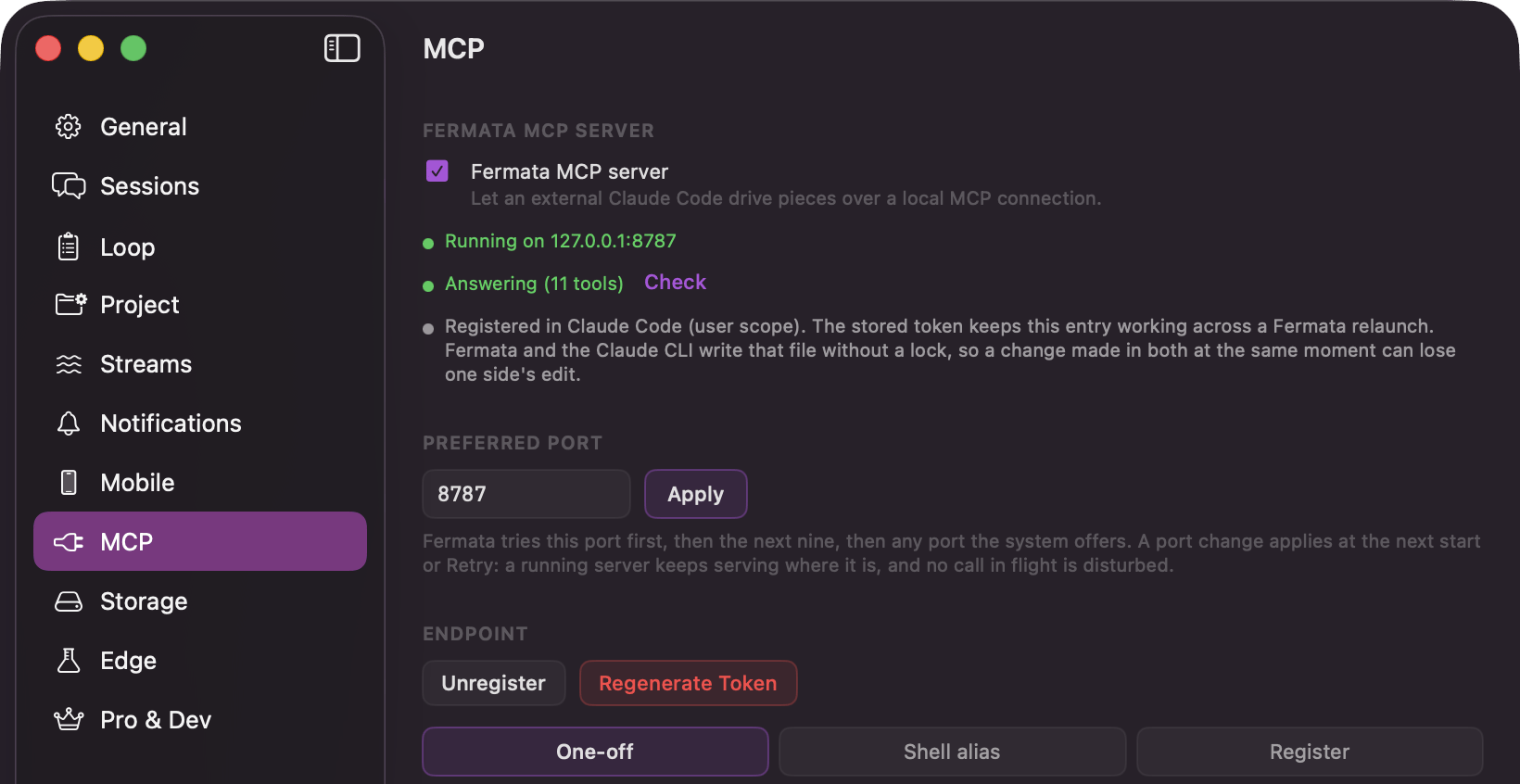
Settings → MCP, then switch on **Fermata MCP server**, captioned "Let an external Claude Code drive pieces over a local MCP connection." It binds to `127.0.0.1` on a local port, and the status row reads "Running on 127.0.0.1" with that port.
**Register** writes the entry into Claude Code for you. If an entry is already there it asks first, with "Replace the Fermata entry in Claude Code?" **Unregister** takes it back out. For a manual setup, **Copy Instructions** gives you a paste-ready command and **Copy Inline Config** the raw connection JSON.
The health row reads "Answering (N tools)" with the number of tools it is serving. That is the quickest way to tell a broken connection from a quiet one.
The server is local only. It listens on the loopback address, so nothing is exposed to your network. A token authenticates the connection, and **Regenerate Token** mints a new one after confirming with "Regenerate the MCP token?"
The port is pinned, so the registered URL survives a relaunch. **Preferred Port** in the same pane sets it, defaulting to 8787. Fermata tries that port first, then the next nine, then any port the system offers, so it only moves when the preferred port is already taken. If the tools stop resolving, check the status row and register again.
## The tools
### Reading
| Tool | What you get |
| - | - |
| `list_projects` | Every project Fermata knows about: id, name, path, tracked branch. |
| `list_pieces` | Pieces, optionally scoped to a project or resolved from your working directory. Each row carries the phase, the pending decision, live run state, agent counts, progress, and the PR URL. |
| `get_piece` | One piece in full: branch and worktree, its configuration, the whole agent graph with dependencies, which actions are legal right now, and during Spec, any unanswered interview questions. |
| `list_sessions` | Sessions with state, model, branch, worktree, cost, and whether one is sitting on a tool approval. |
| `get_session` | One session, optionally with the tail of its transcript. |
| `get_artifact` | The full text of a piece's spec, strategy, summary, or learnings, plus the structured analysis and code review. |
### Driving
| Tool | What it does |
| - | - |
| `register_project` | Registers a directory as a Fermata project, so you can create pieces in it. |
| `create_piece` | Creates a piece and starts its spec interview from your prompt. |
| `create_draft` | Files a draft into a project's Backlog, carrying a pre-written spec, a rough seed, or both. |
| `piece_action` | Moves a piece through its lifecycle. |
| `open_piece_workspace` | Prepares the piece's worktree so you can work on it in the terminal session you are already in. Recreates it from the branch if it was released after the work landed. |
`piece_action` is the one that does the work. It covers answering the interview, approving the spec, generating or regenerating the strategy, approving it, decomposing into agents, starting and pausing and resuming and stopping the run, recovering the failed agents, moving to review, approving an agent, running the code review (refused while that [Edge feature](/configuration/edge) is off), opening the pull request, and marking the piece done and confirming it. Regenerating a spec is not on the list.
An action that is illegal for the current phase fails and tells you which ones are legal instead. `get_piece` reports that same list up front, so a client never has to guess.
## Filing a draft does not start it
`create_draft` parks a card in your Backlog and stops there. You release it in the app: **Run spec** on a Manual or Loop draft, **Play** on an Auto one. Releasing injects the supplied spec and skips the interview.
It takes the [lane](/control/lanes) (`manual`, `auto`, or `loop`) and a refine mode (`none`, `if_gaps`, `always`) that decides whether the supplied spec is used as is or completed at release. Mint the `id` yourself and a retry never files a duplicate. If you already released the card in the app, a resend acknowledges the release instead of filing a second one.
There is one exception. A `loop` draft filed into a project whose Loop is already playing starts immediately, because Play is that lane's standing release. While the Loop is paused it parks like any other draft.
## The confirmation card
The consequential actions do not just happen because a model asked. They raise a dialog on your Mac first, titled "Allow the MCP client to start agents?", with the verb swapped for the action in question. The body names the piece and the project: "An external MCP client wants to start agents on 'upload-retry' (muse)." You answer **Allow** or **Deny**.
Seven actions confirm, and these are the labels the title uses:
| Label | The action |
| - | - |
| start agents | Start the build. |
| stop agents | Stop a run. |
| resume agents | Restart a paused run. |
| recover the failed agents | Retry everything that failed, at once. |
| create a pull request | Open the PR. |
| mark the piece done | Close the piece. |
| approve the spec and run Auto | Approve a spec onto the Auto lane, which releases an unattended run. |
Approving a spec onto the Manual or Loop lane goes through directly; only Auto confirms, because it releases an unattended run. Everything else on the tool list executes directly too.
The request waits with no timeout, exactly like a [gate](/control/gates). If the project's window is closed you get a notification carrying the same sentence, and the card presents as soon as you open the window. Shutting Fermata down, or changing the port, denies every parked confirmation.
## What it does not do
It does not bypass your gates. [Lanes, gates, and permission profiles](/control/two-layers) behave exactly as they do in the app: a piece on the Manual lane still stops at every phase, and a build agent on the Safe profile still raises tool approvals inside Fermata. The MCP server is another way to answer those, not a way around them.
It also never merges. Same rule as everywhere else: it opens the pull request, and you merge.
## Turn it on
Settings → Edge, then **Enable Edge features** and, in the "Features" card, **MCP control plane**. The **MCP** pane appears in Settings once both are on. Turning either switch off hides the pane again and shuts a running server down.
Settings → MCP, then switch on **Fermata MCP server**, captioned "Let an external Claude Code drive pieces over a local MCP connection." It binds to `127.0.0.1` on a local port, and the status row reads "Running on 127.0.0.1" with that port.
**Register** writes the entry into Claude Code for you. If an entry is already there it asks first, with "Replace the Fermata entry in Claude Code?" **Unregister** takes it back out. For a manual setup, **Copy Instructions** gives you a paste-ready command and **Copy Inline Config** the raw connection JSON.
The health row reads "Answering (N tools)" with the number of tools it is serving. That is the quickest way to tell a broken connection from a quiet one.
The server is local only. It listens on the loopback address, so nothing is exposed to your network. A token authenticates the connection, and **Regenerate Token** mints a new one after confirming with "Regenerate the MCP token?"
The port is pinned, so the registered URL survives a relaunch. **Preferred Port** in the same pane sets it, defaulting to 8787. Fermata tries that port first, then the next nine, then any port the system offers, so it only moves when the preferred port is already taken. If the tools stop resolving, check the status row and register again.
## The tools
### Reading
| Tool | What you get |
| - | - |
| `list_projects` | Every project Fermata knows about: id, name, path, tracked branch. |
| `list_pieces` | Pieces, optionally scoped to a project or resolved from your working directory. Each row carries the phase, the pending decision, live run state, agent counts, progress, and the PR URL. |
| `get_piece` | One piece in full: branch and worktree, its configuration, the whole agent graph with dependencies, which actions are legal right now, and during Spec, any unanswered interview questions. |
| `list_sessions` | Sessions with state, model, branch, worktree, cost, and whether one is sitting on a tool approval. |
| `get_session` | One session, optionally with the tail of its transcript. |
| `get_artifact` | The full text of a piece's spec, strategy, summary, or learnings, plus the structured analysis and code review. |
### Driving
| Tool | What it does |
| - | - |
| `register_project` | Registers a directory as a Fermata project, so you can create pieces in it. |
| `create_piece` | Creates a piece and starts its spec interview from your prompt. |
| `create_draft` | Files a draft into a project's Backlog, carrying a pre-written spec, a rough seed, or both. |
| `piece_action` | Moves a piece through its lifecycle. |
| `open_piece_workspace` | Prepares the piece's worktree so you can work on it in the terminal session you are already in. Recreates it from the branch if it was released after the work landed. |
`piece_action` is the one that does the work. It covers answering the interview, approving the spec, generating or regenerating the strategy, approving it, decomposing into agents, starting and pausing and resuming and stopping the run, recovering the failed agents, moving to review, approving an agent, running the code review (refused while that [Edge feature](/configuration/edge) is off), opening the pull request, and marking the piece done and confirming it. Regenerating a spec is not on the list.
An action that is illegal for the current phase fails and tells you which ones are legal instead. `get_piece` reports that same list up front, so a client never has to guess.
## Filing a draft does not start it
`create_draft` parks a card in your Backlog and stops there. You release it in the app: **Run spec** on a Manual or Loop draft, **Play** on an Auto one. Releasing injects the supplied spec and skips the interview.
It takes the [lane](/control/lanes) (`manual`, `auto`, or `loop`) and a refine mode (`none`, `if_gaps`, `always`) that decides whether the supplied spec is used as is or completed at release. Mint the `id` yourself and a retry never files a duplicate. If you already released the card in the app, a resend acknowledges the release instead of filing a second one.
There is one exception. A `loop` draft filed into a project whose Loop is already playing starts immediately, because Play is that lane's standing release. While the Loop is paused it parks like any other draft.
## The confirmation card
The consequential actions do not just happen because a model asked. They raise a dialog on your Mac first, titled "Allow the MCP client to start agents?", with the verb swapped for the action in question. The body names the piece and the project: "An external MCP client wants to start agents on 'upload-retry' (muse)." You answer **Allow** or **Deny**.
Seven actions confirm, and these are the labels the title uses:
| Label | The action |
| - | - |
| start agents | Start the build. |
| stop agents | Stop a run. |
| resume agents | Restart a paused run. |
| recover the failed agents | Retry everything that failed, at once. |
| create a pull request | Open the PR. |
| mark the piece done | Close the piece. |
| approve the spec and run Auto | Approve a spec onto the Auto lane, which releases an unattended run. |
Approving a spec onto the Manual or Loop lane goes through directly; only Auto confirms, because it releases an unattended run. Everything else on the tool list executes directly too.
The request waits with no timeout, exactly like a [gate](/control/gates). If the project's window is closed you get a notification carrying the same sentence, and the card presents as soon as you open the window. Shutting Fermata down, or changing the port, denies every parked confirmation.
## What it does not do
It does not bypass your gates. [Lanes, gates, and permission profiles](/control/two-layers) behave exactly as they do in the app: a piece on the Manual lane still stops at every phase, and a build agent on the Safe profile still raises tool approvals inside Fermata. The MCP server is another way to answer those, not a way around them.
It also never merges. Same rule as everywhere else: it opens the pull request, and you merge.