> ## Documentation Index
> Fetch the complete documentation index at: https://docs.fermata.run/llms.txt
> Use this file to discover all available pages before exploring further.
# Starting from an issue
> Connect Linear or GitHub, pick an issue, and it becomes the spec or the requirement. The branch carries the issue key and the pull request closes the issue.
Most work already lives in a tracker. Loop intake reads it from there: connect Linear or GitHub once, pick an issue, and its cleaned text becomes the spec, or the requirement the spec is written from. The branch carries the issue key, and the pull request opens with a closing line, so the tracker follows the piece without you retyping anything.
This is an Edge preview, off by default. Settings → Edge, then **Enable Edge features** and, in the "Features" card, **Loop intake**. See [Edge features](/configuration/edge) for what the channel means.
## Connect a tracker
Settings → Streams appears once the feature is on. It holds your Stream Sources: "Stream Sources are the accounts Fermata reads issues from. Keys stay in your Keychain."
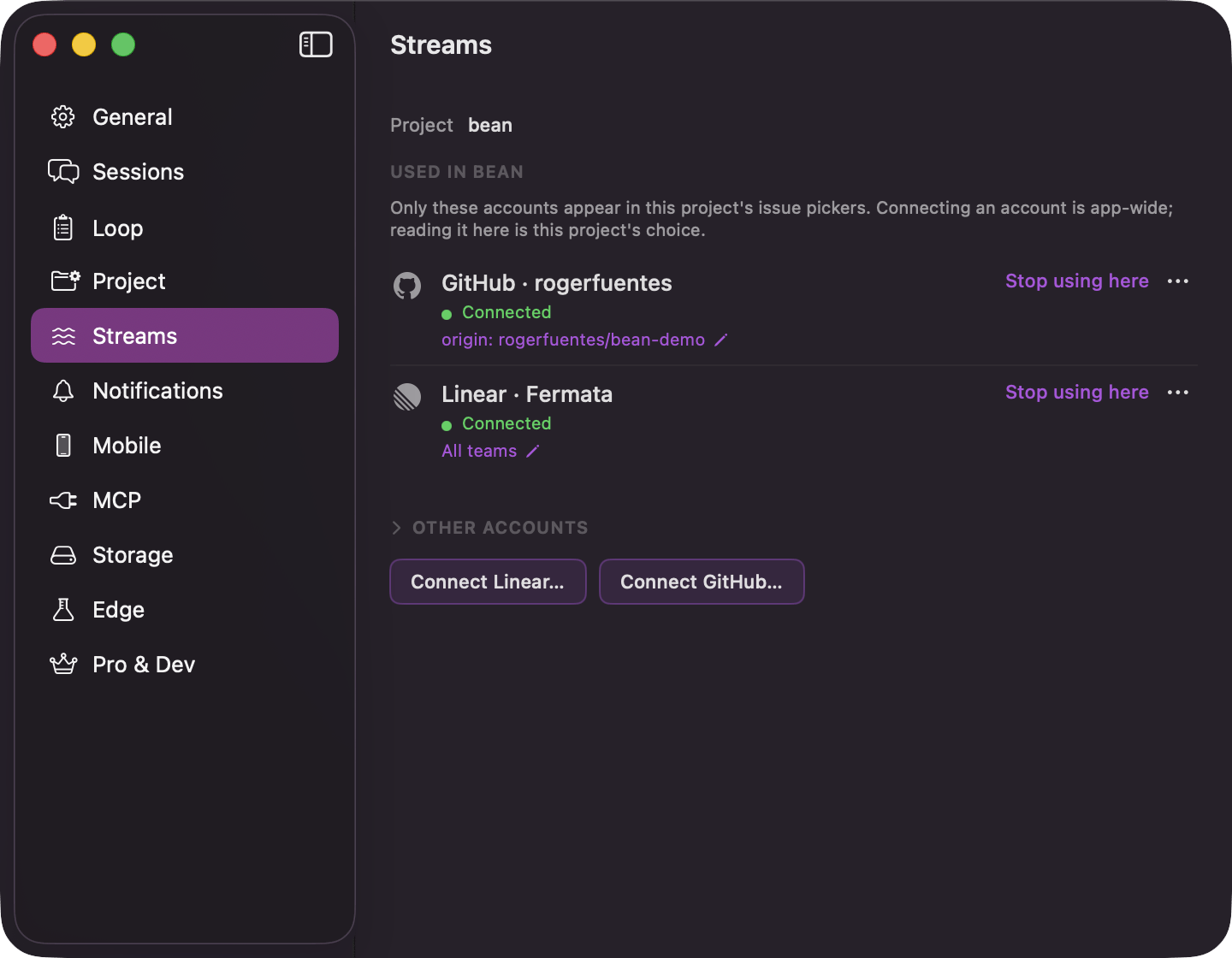 **Connect Linear…** takes a personal API key. The sheet says "Paste a Linear personal API key. Fermata reads the workspace name back from it." and links to where Linear mints one.
**Connect GitHub…** offers the GitHub CLI first. If `gh` is logged in to github.com, one click on **Use gh account**, which names the logged-in account, connects it, and nothing is stored: "Fermata asks the GitHub CLI for its token when it reads issues." Without the CLI, paste a fine-grained token with read access to Issues.
Either way the credential is checked against the tracker before anything is stored; a refused key keeps the sheet open with the reason and stores nothing.
Each connected source is a row naming the kind and the account it reads ("Linear · Acme", "GitHub · octocat"), with a health line under it. "Connected" is green; otherwise the line says what is wrong: "Not checked yet", "Rate limited, retry shortly", "API key expired or revoked", "GitHub CLI is logged out". Health is checked when the pane appears and on **Check now**. The pane only reads; nothing in Streams writes to Linear or GitHub.
**Remove** confirms with "Remove this Stream Source?" and says what removal does. A pasted key is deleted from the Keychain; a CLI connection leaves the GitHub CLI logged in. Either way, "Pieces already started from its issues keep their links."
## Three ways in
**Connect Linear…** takes a personal API key. The sheet says "Paste a Linear personal API key. Fermata reads the workspace name back from it." and links to where Linear mints one.
**Connect GitHub…** offers the GitHub CLI first. If `gh` is logged in to github.com, one click on **Use gh account**, which names the logged-in account, connects it, and nothing is stored: "Fermata asks the GitHub CLI for its token when it reads issues." Without the CLI, paste a fine-grained token with read access to Issues.
Either way the credential is checked against the tracker before anything is stored; a refused key keeps the sheet open with the reason and stores nothing.
Each connected source is a row naming the kind and the account it reads ("Linear · Acme", "GitHub · octocat"), with a health line under it. "Connected" is green; otherwise the line says what is wrong: "Not checked yet", "Rate limited, retry shortly", "API key expired or revoked", "GitHub CLI is logged out". Health is checked when the pane appears and on **Check now**. The pane only reads; nothing in Streams writes to Linear or GitHub.
**Remove** confirms with "Remove this Stream Source?" and says what removal does. A pasted key is deleted from the Keychain; a CLI connection leaves the GitHub CLI logged in. Either way, "Pieces already started from its issues keep their links."
## Three ways in
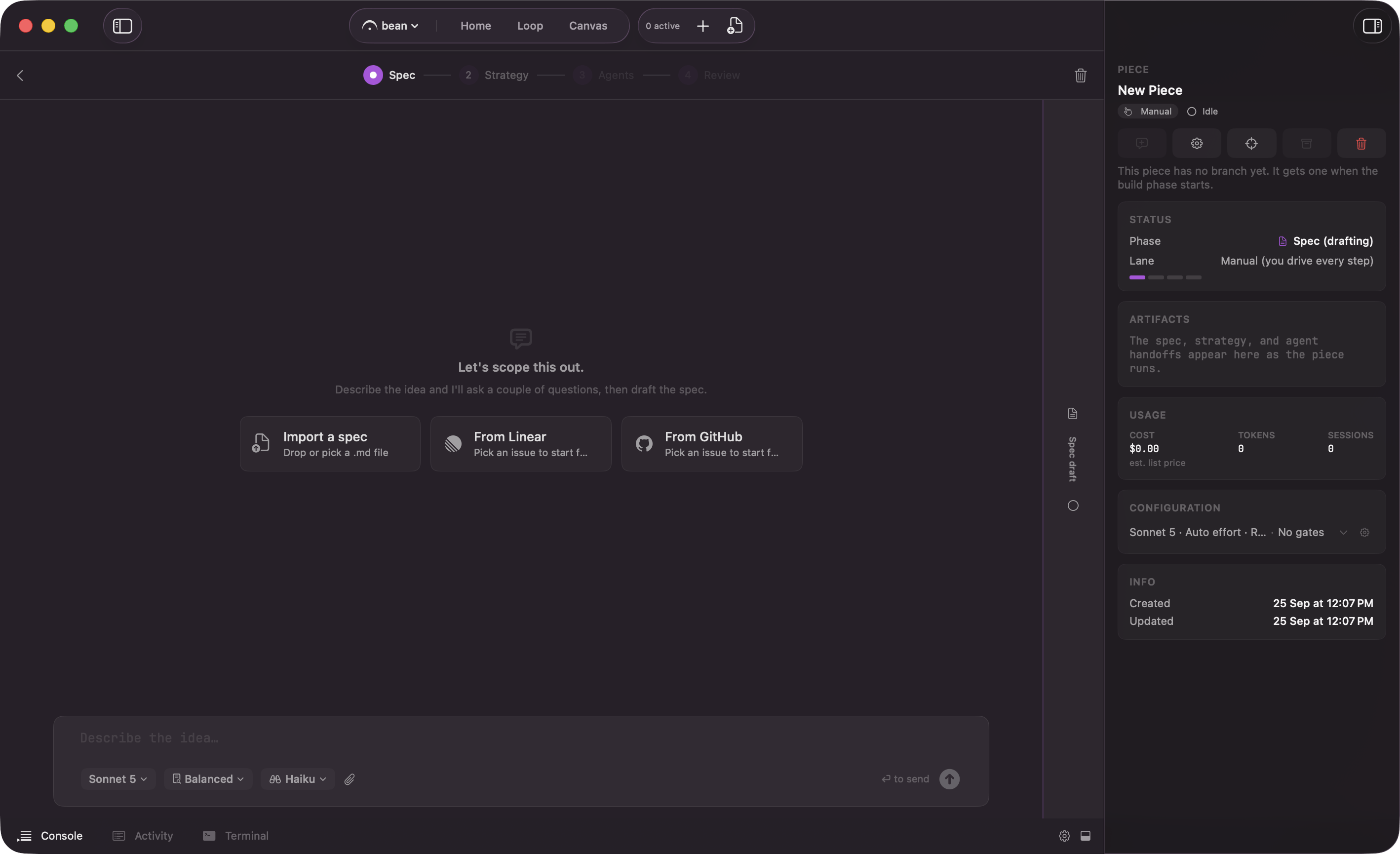 * **The empty spec screen.** Beside **Import a spec**, one tile per connected tracker: **From Linear** and **From GitHub**. The pick lands in the interview you are already in; see [the interview and the spec](/piece/interview-and-spec).
* **The New Piece sheet.** **Start from Linear issue** and **Start from GitHub issue**, wherever the sheet opens: the Loop board, Home's quick start, the Pieces hub.
* **The Backlog "+".** The same two buttons, but the issue parks as a draft instead of starting.
The GitHub button only shows when the project's `origin` is on github.com, because a GitHub pick is scoped to that repository. A Linear pick searches the whole workspace.
On the New Piece sheet and the Backlog "+", a pick only fills the sheet: the title is taken from the issue, and a picked-issue block replaces the description with the key, the title, what the chosen action will do, and a way to remove it. Lane, model, and attachments stay whatever you set. Nothing runs until you press the sheet's own button.
## Pick the issue
The picker is a two-pane sheet: the list on the left, the preview on the right.
* **The empty spec screen.** Beside **Import a spec**, one tile per connected tracker: **From Linear** and **From GitHub**. The pick lands in the interview you are already in; see [the interview and the spec](/piece/interview-and-spec).
* **The New Piece sheet.** **Start from Linear issue** and **Start from GitHub issue**, wherever the sheet opens: the Loop board, Home's quick start, the Pieces hub.
* **The Backlog "+".** The same two buttons, but the issue parks as a draft instead of starting.
The GitHub button only shows when the project's `origin` is on github.com, because a GitHub pick is scoped to that repository. A Linear pick searches the whole workspace.
On the New Piece sheet and the Backlog "+", a pick only fills the sheet: the title is taken from the issue, and a picked-issue block replaces the description with the key, the title, what the chosen action will do, and a way to remove it. Lane, model, and attachments stay whatever you set. Nothing runs until you press the sheet's own button.
## Pick the issue
The picker is a two-pane sheet: the list on the left, the preview on the right.
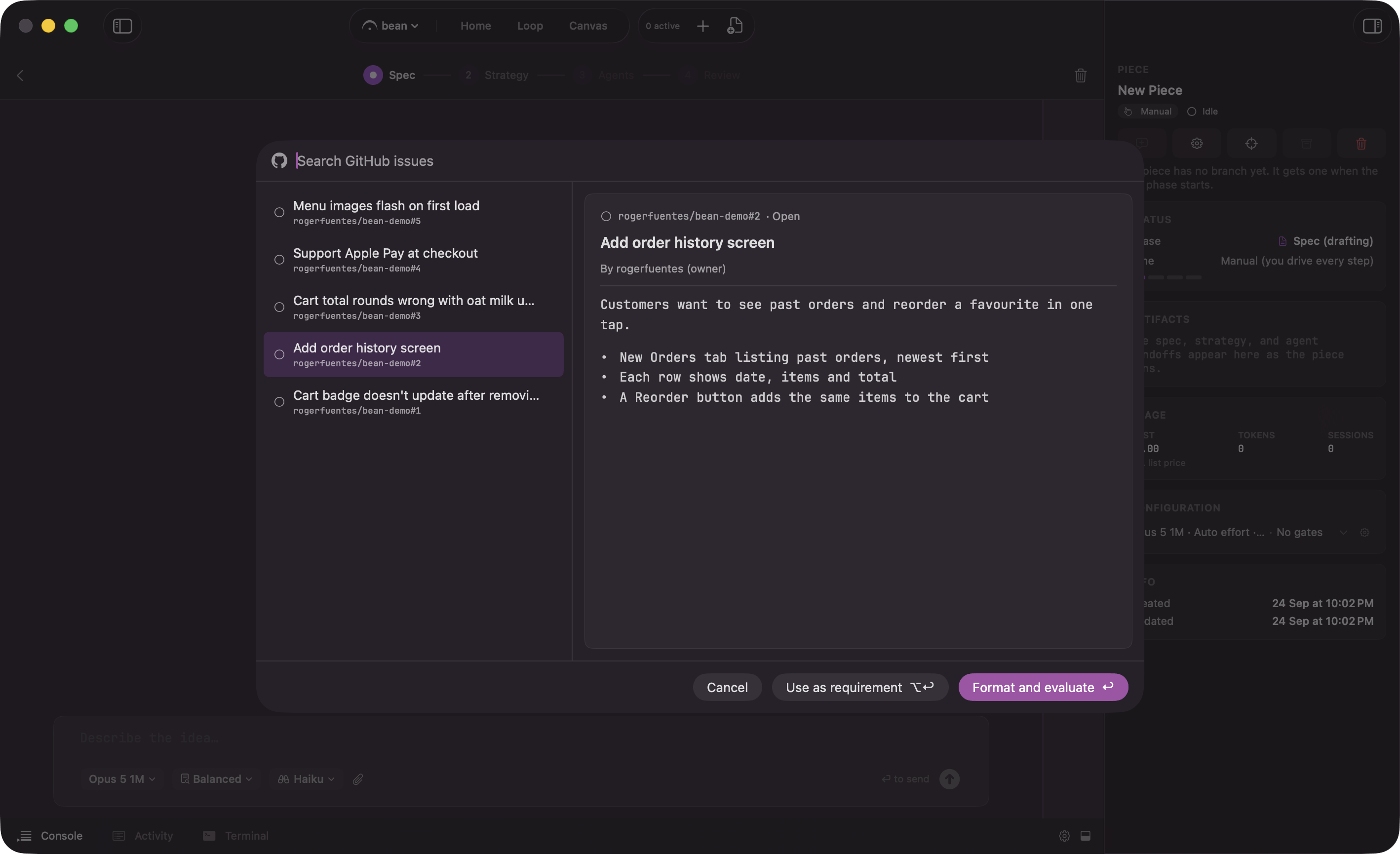 The search field ("Search Linear issues", "Search GitHub issues") starts on the most recently updated open issues and filters as you type; done and canceled issues never appear. The keyboard drives the whole thing: ↑/↓ move, ↩ picks with **Format and evaluate**, ⌥↩ with **Use as requirement**, Esc cancels. A double-click is **Format and evaluate**. When more than one account of the same kind is connected, a menu in the header switches between them.
Each row shows the issue's state, title, and key. An issue with open blockers wears a "Blocked by N" badge.
The preview on the right is the issue as the agent will read it: the cleaned description and the latest comments. Hidden content in the issue, such as HTML comments or invisible text, is removed before anything reads it, and a disclosure line above the description says what was cut. A long issue is trimmed for display only: "The preview stops here. The agent reads the whole description." Links in an issue are someone else's text, so the preview opens web links only. The preview is a window, not a gate; you can pick without reading it.
## Two ways to take it
The footer offers two actions, and the difference is who writes the spec.
* **Format and evaluate** (↩): the issue becomes the spec, then Format & validate runs. For an issue that is already spec-shaped and just needs the mechanical pass.
* **Use as requirement** (⌥↩): the issue is saved as `kickoff.md` and the spec is written from it. For an issue that says what, not how.
Picking an issue with open blockers raises the picker's only confirmation, named after what blocks it: "Blocked by SUP-12 (In Progress). Start anyway?" **Start anyway** proceeds; Fermata does not refuse, it makes sure you saw.
## Parked in the Backlog
An issue picked from the Backlog "+" becomes a draft carrying the issue instead of a description.
The search field ("Search Linear issues", "Search GitHub issues") starts on the most recently updated open issues and filters as you type; done and canceled issues never appear. The keyboard drives the whole thing: ↑/↓ move, ↩ picks with **Format and evaluate**, ⌥↩ with **Use as requirement**, Esc cancels. A double-click is **Format and evaluate**. When more than one account of the same kind is connected, a menu in the header switches between them.
Each row shows the issue's state, title, and key. An issue with open blockers wears a "Blocked by N" badge.
The preview on the right is the issue as the agent will read it: the cleaned description and the latest comments. Hidden content in the issue, such as HTML comments or invisible text, is removed before anything reads it, and a disclosure line above the description says what was cut. A long issue is trimmed for display only: "The preview stops here. The agent reads the whole description." Links in an issue are someone else's text, so the preview opens web links only. The preview is a window, not a gate; you can pick without reading it.
## Two ways to take it
The footer offers two actions, and the difference is who writes the spec.
* **Format and evaluate** (↩): the issue becomes the spec, then Format & validate runs. For an issue that is already spec-shaped and just needs the mechanical pass.
* **Use as requirement** (⌥↩): the issue is saved as `kickoff.md` and the spec is written from it. For an issue that says what, not how.
Picking an issue with open blockers raises the picker's only confirmation, named after what blocks it: "Blocked by SUP-12 (In Progress). Start anyway?" **Start anyway** proceeds; Fermata does not refuse, it makes sure you saw.
## Parked in the Backlog
An issue picked from the Backlog "+" becomes a draft carrying the issue instead of a description.
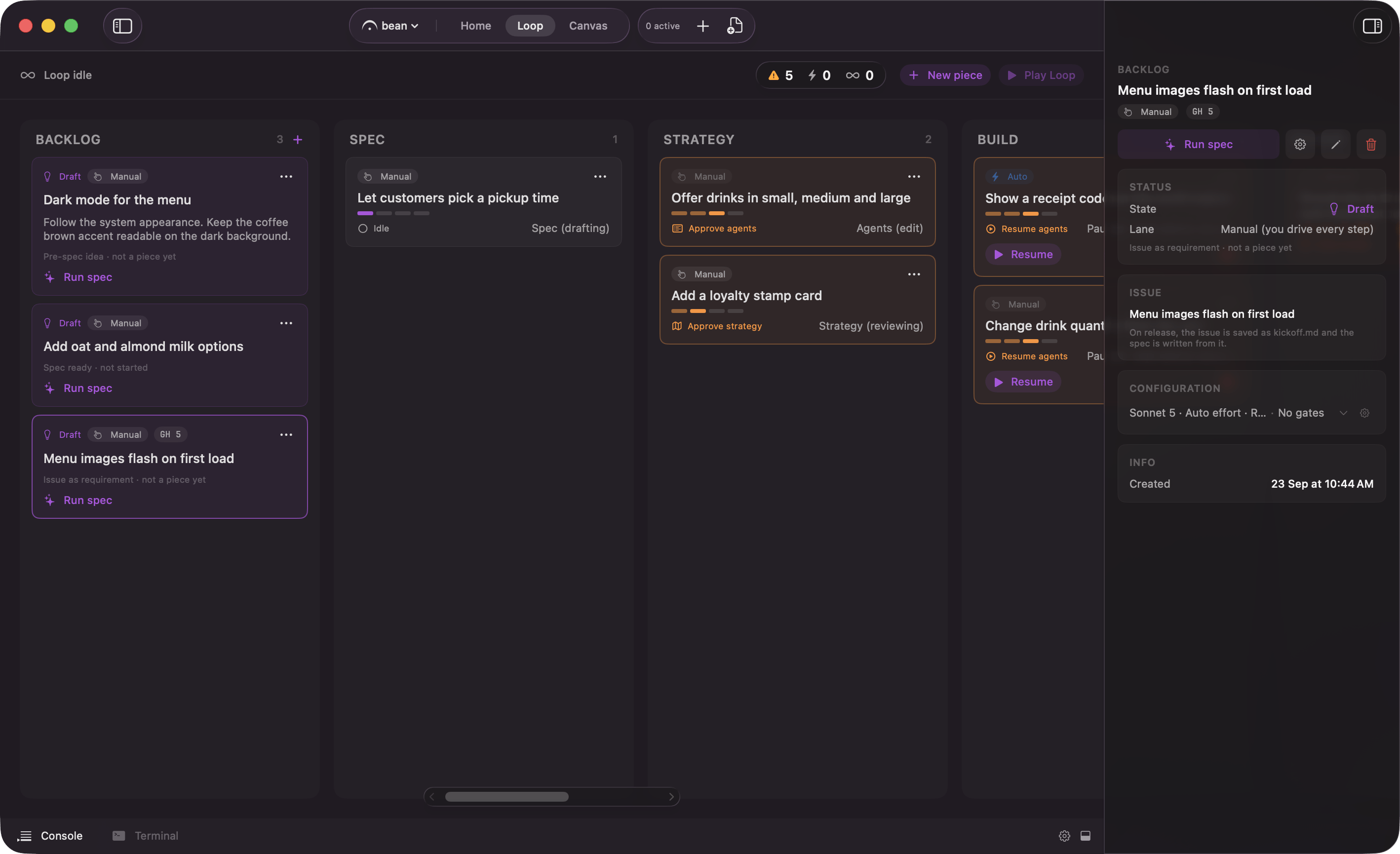 Release works like any other draft, with the pick's action baked in: a **Format and evaluate** draft writes the spec and runs the pass on release, a **Use as requirement** draft goes through `kickoff.md`. The card and its inspector show the source chip, and the piece logs the start with the key ("Started from SUP-12") when it releases. Drafts, release, and the [lanes](/control/lanes) they land on are covered on [the Loop board](/loop/board).
## The branch and the pull request
A piece started from an issue keeps the link end to end.
* **The branch carries the key.** A Linear key lowercases into the branch slug (`sup-142-parser-crash`); a GitHub issue contributes its bare number. The key is read from the source link, not the piece name, so it survives the rename at spec approval.
* **The pull request closes the issue.** **Create PR** puts one closing line on the first line of the description: `Closes SUP-142`, or `Closes owner/repo#142` for GitHub. Any other closing reference the generated title or description picked up along the way is removed, so exactly one issue closes and it is the one you started from; the Create PR sheet carries a caption saying both. As everywhere in Fermata, it opens the pull request and you merge.
* **A base check after opening.** GitHub only closes an issue when the pull request merges into the repository's default branch. Once the PR is open, Fermata reads its real base, and when it is not the default, the piece's activity log warns that the issue will stay open.
The base branch you pick does not decide a piece PR's target yet: the setting never reaches `gh pr create`, so the pull request opens against the repository's default branch unless a `gh-merge-base` branch config says otherwise. The base check above tells you when that mismatch will keep the issue open. This is a known gap.
Release works like any other draft, with the pick's action baked in: a **Format and evaluate** draft writes the spec and runs the pass on release, a **Use as requirement** draft goes through `kickoff.md`. The card and its inspector show the source chip, and the piece logs the start with the key ("Started from SUP-12") when it releases. Drafts, release, and the [lanes](/control/lanes) they land on are covered on [the Loop board](/loop/board).
## The branch and the pull request
A piece started from an issue keeps the link end to end.
* **The branch carries the key.** A Linear key lowercases into the branch slug (`sup-142-parser-crash`); a GitHub issue contributes its bare number. The key is read from the source link, not the piece name, so it survives the rename at spec approval.
* **The pull request closes the issue.** **Create PR** puts one closing line on the first line of the description: `Closes SUP-142`, or `Closes owner/repo#142` for GitHub. Any other closing reference the generated title or description picked up along the way is removed, so exactly one issue closes and it is the one you started from; the Create PR sheet carries a caption saying both. As everywhere in Fermata, it opens the pull request and you merge.
* **A base check after opening.** GitHub only closes an issue when the pull request merges into the repository's default branch. Once the PR is open, Fermata reads its real base, and when it is not the default, the piece's activity log warns that the issue will stay open.
The base branch you pick does not decide a piece PR's target yet: the setting never reaches `gh pr create`, so the pull request opens against the repository's default branch unless a `gh-merge-base` branch config says otherwise. The base check above tells you when that mismatch will keep the issue open. This is a known gap.