> ## Documentation Index
> Fetch the complete documentation index at: https://docs.fermata.run/llms.txt
> Use this file to discover all available pages before exploring further.
# Agents
> The strategy decomposed into a graph of agents, edited by you before anything runs, then worked through in waves inside the piece's own worktree and branch.
Approving the strategy decomposes it into a graph of agents: one agent per unit of work, plus the dependencies between them. The graph is shown to you before anything runs, and it is editable. This is the last point where the whole plan is cheap to change: once the run starts you can still edit the prompt of an agent that has not started and insert a new agent into the live run, but not reshape the graph.
How many agents the decomposition produces in the first place follows the strategy's Estimated Complexity, unless the piece's **Split budget** overrides it. See [Strategy](/piece/strategy) for where Estimated Complexity comes from and [limits](/loop/limits) for the size-to-cap table and the split budget.
## Edit the graph before it runs
The toolbar carries the graph editors and a count of how many agents the decomposition produced. These only apply before the run starts, while the piece is still at Agents, unstarted.
* **Add Agent** appends a new one for work the plan missed.
* **Re-decompose** rebuilds the whole graph from the same approved strategy, which is the right move when the split is wrong rather than one entry.
* **Rework Strategy** discards the agent graph, including any reordering, additions, or removals you made by hand, and reopens the strategy that produced it. Confirming asks a second question: **Rework and hold** parks the piece at the strategy until you approve it yourself, and **Rework and keep running** generates a fresh strategy immediately so an autonomous run carries on from the new plan instead of waiting on the one you just rejected. See [Strategy](/piece/strategy).
Select an agent to open its detail panel and edit its **Name**, **Description**, **Files**, **Role**, and **Model Override**, or remove it with **Delete Agent**. The panel's "Dependencies (this agent depends on)" list is where the order actually lives: it sets which other agents this one waits for, and the graph redraws around it.
Fermata appends one agent of its own after the last one: the review step, named "Review the work against the spec". It depends on every other agent, and its panel is locked; the fields read "The review step is managed by Fermata". What it checks is covered under [the work review](/piece/review-and-pull-request#the-work-review).
**Start Execution** dispatches the run. It stays disabled while the graph has validation problems or the strategy still has unresolved notes, and the tooltip says which. Whether the piece stops here for your approval at all is the plan gate, covered on [gates](/control/gates).
## Change the plan mid-run
The graph is not frozen the moment the run starts. Two edits stay open while a run is running or paused; both close once it completes, because there is nothing left to schedule.
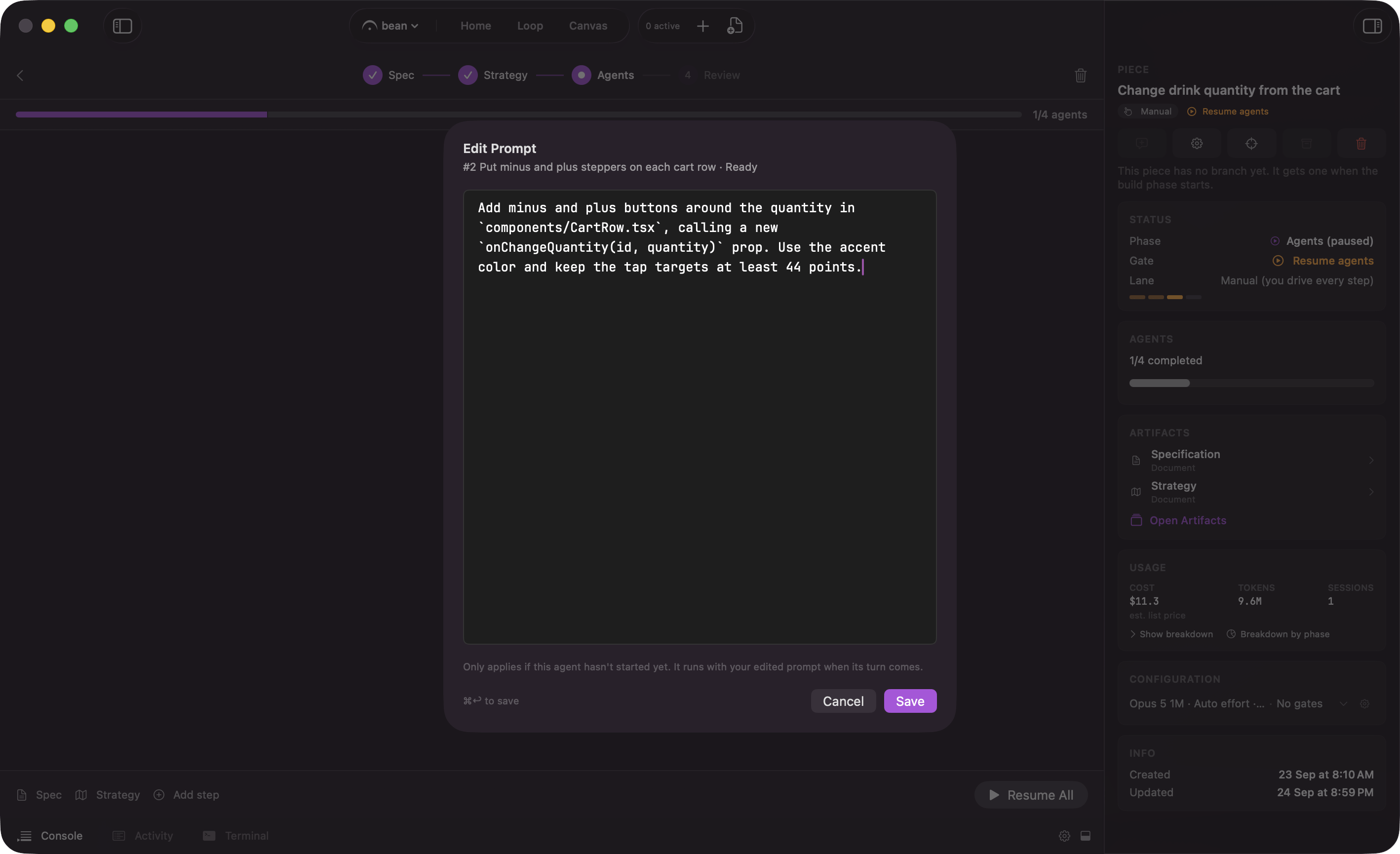
A queued or ready agent's card carries a pencil icon that opens "Edit Prompt": its description in a text box, prefilled, with "Only applies if this agent hasn't started yet. It runs with your edited prompt when its turn comes." **Save** (⌘↩) commits it; **Cancel** discards it. Saving is optimistic: if the agent started while the sheet was open, the save is rejected and the sheet switches to "This agent already started", explaining that the change was not applied and offering **Open Agent View** to steer the running session instead with a follow-up message.
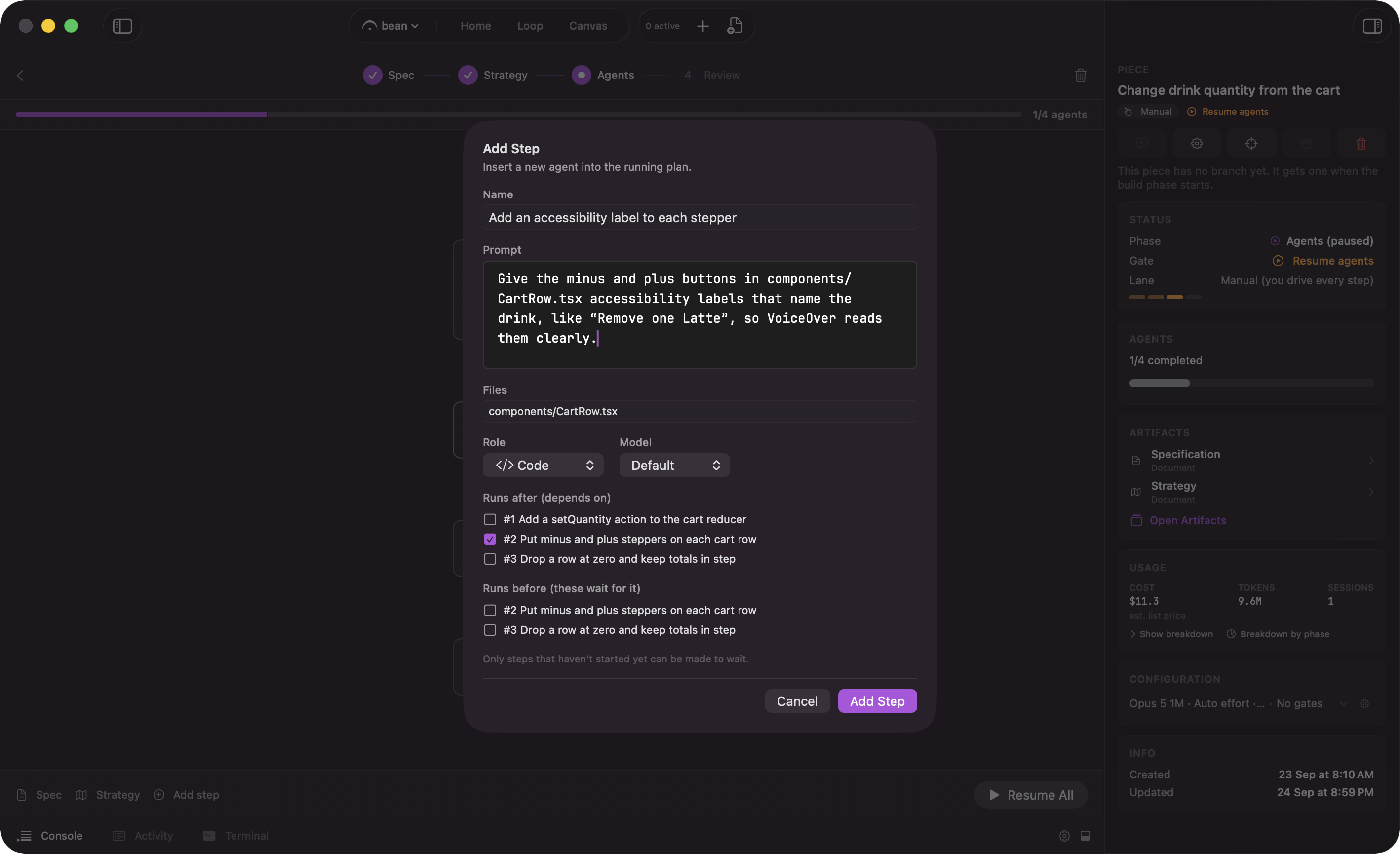
**Add step**, on the phase action bar, opens the "Add Step" sheet: **Name**, **Prompt**, **Files**, **Role**, **Model**, a "Runs after (depends on)" checklist of the agents it can wait for, and a "Runs before (these wait for it)" checklist of the agents that have not started yet. It is the same job **Add Agent** does before the run starts, with more to fill in because the graph it is joining is already committed. If a "runs before" agent starts before you save, or wiring it in would form a cycle, the step is still added and the sheet reports which of those agents it could not reach.
Both edits are recorded to the piece's `deviations.json`, and the run's summary ends with a "Deviations from plan" section listing what changed, so the plan a piece was built from is never silently different from the one that was approved.
## Waves
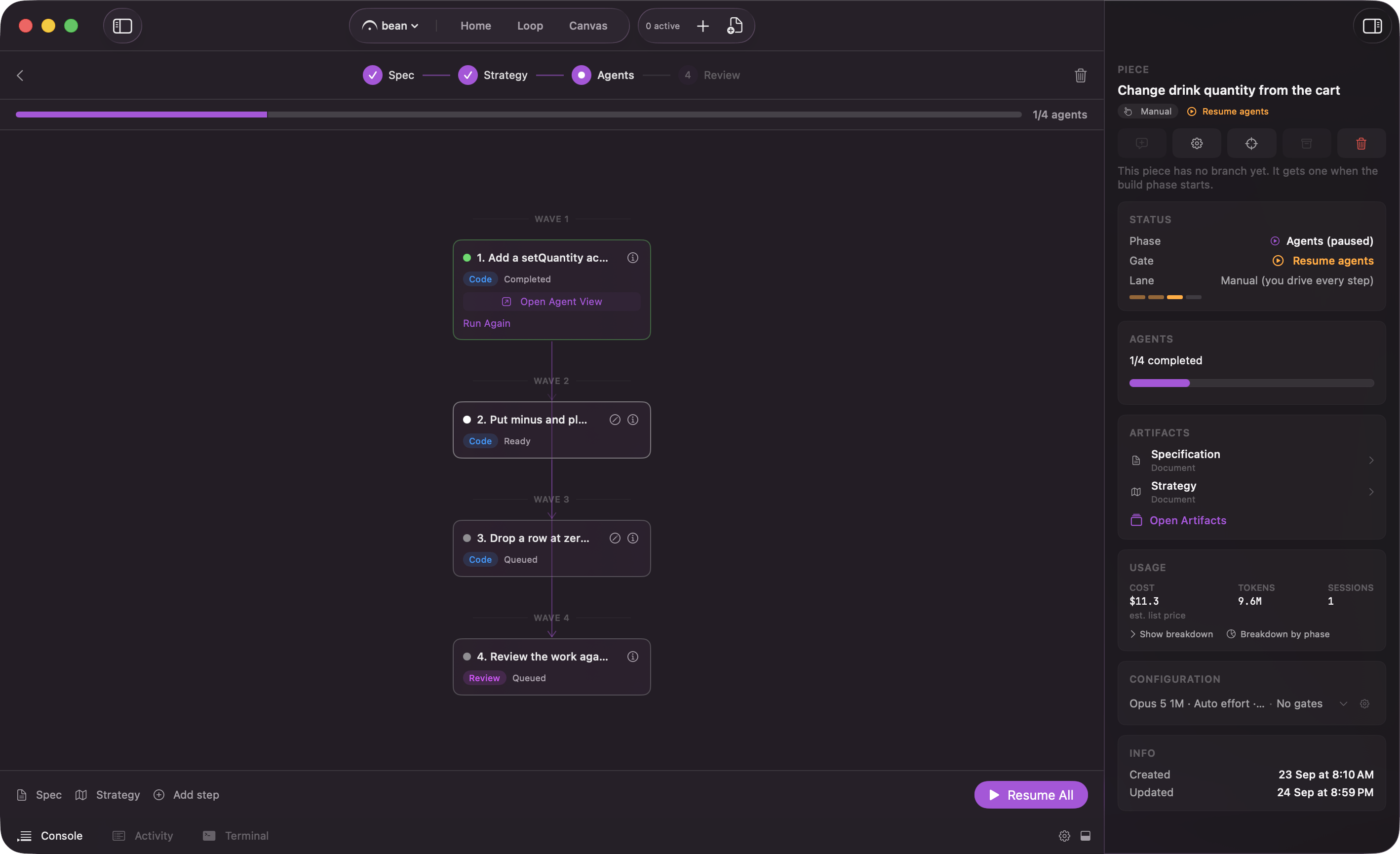
The graph runs in waves. An agent with no dependencies is in the first wave and starts immediately; an agent that depends on others waits for them and lands in a later wave. Everything in the same wave runs at the same time, and the surface labels the rows "Wave 1", "Wave 2", and so on.
So you do not order agents directly. You say what depends on what, and the waves fall out of that. How many run at once across all your work is a separate cap, covered on [limits](/loop/limits).
## Where the work happens
The piece gets one git worktree and one branch of its own, named `fermata/{piece}` by default, created off to the side of your checkout. Every agent in the graph is a session working in that one worktree, and each commits its own changes when it finishes. Nothing lands in your working copy. Agents never push: the branch stays local until you click **Create PR** at Review.
What an agent may do without stopping to ask you is a separate question from all of this. It is set by the piece's permission profile, covered on [permission profiles and approvals](/control/permissions-and-approvals).
## Watching it run
The phase header carries a progress bar, a count like "3/7 agents", how many are running right now, and the run's cost so far. Each agent renders as a card in its wave, colored by state, with arrows drawn to the agents it depends on. Open any one with **Open Agent View** to read its transcript.
You can also watch from the [Canvas](/surfaces/canvas-and-sessions), where the piece renders as a single expandable container card: the chevron opens it in place to show the same wave-grouped agents and the sessions underneath them.
## Pausing, stopping, resuming
Three controls sit on the phase action bar:
| Control | What it does |
| - | - |
| **Pause All** | Stops dispatching more work. Keyboard: ⌘⇧P. |
| **Stop All** | Halts every running agent and parks the run so you can resume it later. No work is discarded. Keyboard: ⌘⇧. (period) |
| **Resume All** | Picks a paused or stopped run back up. |
From a running card on the [Loop board](/loop/board) the same two stops are hover buttons: **Pause after this phase**, which lets the current phase finish, and **Hard-stop now (keeps the worktree)**, which does not.
## When an agent fails
A failed agent does not sink the run. Its card names what happened and offers a way forward. See [when an agent fails](/piece/when-an-agent-fails) for the failure kinds, the per-agent recovery options, and the policy that decides how much of this happens without you.
With a clean run, once the review step that runs after the last agent has written its verdict, the action bar reads **Continue to Review**, and the piece moves on to [Review](/piece/review-and-pull-request) with that verdict beside the diff.
 How many agents the decomposition produces in the first place follows the strategy's Estimated Complexity, unless the piece's **Split budget** overrides it. See [Strategy](/piece/strategy) for where Estimated Complexity comes from and [limits](/loop/limits) for the size-to-cap table and the split budget.
## Edit the graph before it runs
The toolbar carries the graph editors and a count of how many agents the decomposition produced. These only apply before the run starts, while the piece is still at Agents, unstarted.
* **Add Agent** appends a new one for work the plan missed.
* **Re-decompose** rebuilds the whole graph from the same approved strategy, which is the right move when the split is wrong rather than one entry.
* **Rework Strategy** discards the agent graph, including any reordering, additions, or removals you made by hand, and reopens the strategy that produced it. Confirming asks a second question: **Rework and hold** parks the piece at the strategy until you approve it yourself, and **Rework and keep running** generates a fresh strategy immediately so an autonomous run carries on from the new plan instead of waiting on the one you just rejected. See [Strategy](/piece/strategy).
Select an agent to open its detail panel and edit its **Name**, **Description**, **Files**, **Role**, and **Model Override**, or remove it with **Delete Agent**. The panel's "Dependencies (this agent depends on)" list is where the order actually lives: it sets which other agents this one waits for, and the graph redraws around it.
Fermata appends one agent of its own after the last one: the review step, named "Review the work against the spec". It depends on every other agent, and its panel is locked; the fields read "The review step is managed by Fermata". What it checks is covered under [the work review](/piece/review-and-pull-request#the-work-review).
**Start Execution** dispatches the run. It stays disabled while the graph has validation problems or the strategy still has unresolved notes, and the tooltip says which. Whether the piece stops here for your approval at all is the plan gate, covered on [gates](/control/gates).
## Change the plan mid-run
The graph is not frozen the moment the run starts. Two edits stay open while a run is running or paused; both close once it completes, because there is nothing left to schedule.
A queued or ready agent's card carries a pencil icon that opens "Edit Prompt": its description in a text box, prefilled, with "Only applies if this agent hasn't started yet. It runs with your edited prompt when its turn comes." **Save** (⌘↩) commits it; **Cancel** discards it. Saving is optimistic: if the agent started while the sheet was open, the save is rejected and the sheet switches to "This agent already started", explaining that the change was not applied and offering **Open Agent View** to steer the running session instead with a follow-up message.
How many agents the decomposition produces in the first place follows the strategy's Estimated Complexity, unless the piece's **Split budget** overrides it. See [Strategy](/piece/strategy) for where Estimated Complexity comes from and [limits](/loop/limits) for the size-to-cap table and the split budget.
## Edit the graph before it runs
The toolbar carries the graph editors and a count of how many agents the decomposition produced. These only apply before the run starts, while the piece is still at Agents, unstarted.
* **Add Agent** appends a new one for work the plan missed.
* **Re-decompose** rebuilds the whole graph from the same approved strategy, which is the right move when the split is wrong rather than one entry.
* **Rework Strategy** discards the agent graph, including any reordering, additions, or removals you made by hand, and reopens the strategy that produced it. Confirming asks a second question: **Rework and hold** parks the piece at the strategy until you approve it yourself, and **Rework and keep running** generates a fresh strategy immediately so an autonomous run carries on from the new plan instead of waiting on the one you just rejected. See [Strategy](/piece/strategy).
Select an agent to open its detail panel and edit its **Name**, **Description**, **Files**, **Role**, and **Model Override**, or remove it with **Delete Agent**. The panel's "Dependencies (this agent depends on)" list is where the order actually lives: it sets which other agents this one waits for, and the graph redraws around it.
Fermata appends one agent of its own after the last one: the review step, named "Review the work against the spec". It depends on every other agent, and its panel is locked; the fields read "The review step is managed by Fermata". What it checks is covered under [the work review](/piece/review-and-pull-request#the-work-review).
**Start Execution** dispatches the run. It stays disabled while the graph has validation problems or the strategy still has unresolved notes, and the tooltip says which. Whether the piece stops here for your approval at all is the plan gate, covered on [gates](/control/gates).
## Change the plan mid-run
The graph is not frozen the moment the run starts. Two edits stay open while a run is running or paused; both close once it completes, because there is nothing left to schedule.
A queued or ready agent's card carries a pencil icon that opens "Edit Prompt": its description in a text box, prefilled, with "Only applies if this agent hasn't started yet. It runs with your edited prompt when its turn comes." **Save** (⌘↩) commits it; **Cancel** discards it. Saving is optimistic: if the agent started while the sheet was open, the save is rejected and the sheet switches to "This agent already started", explaining that the change was not applied and offering **Open Agent View** to steer the running session instead with a follow-up message.
 **Add step**, on the phase action bar, opens the "Add Step" sheet: **Name**, **Prompt**, **Files**, **Role**, **Model**, a "Runs after (depends on)" checklist of the agents it can wait for, and a "Runs before (these wait for it)" checklist of the agents that have not started yet. It is the same job **Add Agent** does before the run starts, with more to fill in because the graph it is joining is already committed. If a "runs before" agent starts before you save, or wiring it in would form a cycle, the step is still added and the sheet reports which of those agents it could not reach.
 Both edits are recorded to the piece's `deviations.json`, and the run's summary ends with a "Deviations from plan" section listing what changed, so the plan a piece was built from is never silently different from the one that was approved.
## Waves
The graph runs in waves. An agent with no dependencies is in the first wave and starts immediately; an agent that depends on others waits for them and lands in a later wave. Everything in the same wave runs at the same time, and the surface labels the rows "Wave 1", "Wave 2", and so on.
So you do not order agents directly. You say what depends on what, and the waves fall out of that. How many run at once across all your work is a separate cap, covered on [limits](/loop/limits).
## Where the work happens
The piece gets one git worktree and one branch of its own, named `fermata/{piece}` by default, created off to the side of your checkout. Every agent in the graph is a session working in that one worktree, and each commits its own changes when it finishes. Nothing lands in your working copy. Agents never push: the branch stays local until you click **Create PR** at Review.
What an agent may do without stopping to ask you is a separate question from all of this. It is set by the piece's permission profile, covered on [permission profiles and approvals](/control/permissions-and-approvals).
## Watching it run
The phase header carries a progress bar, a count like "3/7 agents", how many are running right now, and the run's cost so far. Each agent renders as a card in its wave, colored by state, with arrows drawn to the agents it depends on. Open any one with **Open Agent View** to read its transcript.
You can also watch from the [Canvas](/surfaces/canvas-and-sessions), where the piece renders as a single expandable container card: the chevron opens it in place to show the same wave-grouped agents and the sessions underneath them.
## Pausing, stopping, resuming
Three controls sit on the phase action bar:
| Control | What it does |
| - | - |
| **Pause All** | Stops dispatching more work. Keyboard: ⌘⇧P. |
| **Stop All** | Halts every running agent and parks the run so you can resume it later. No work is discarded. Keyboard: ⌘⇧. (period) |
| **Resume All** | Picks a paused or stopped run back up. |
From a running card on the [Loop board](/loop/board) the same two stops are hover buttons: **Pause after this phase**, which lets the current phase finish, and **Hard-stop now (keeps the worktree)**, which does not.
## When an agent fails
A failed agent does not sink the run. Its card names what happened and offers a way forward. See [when an agent fails](/piece/when-an-agent-fails) for the failure kinds, the per-agent recovery options, and the policy that decides how much of this happens without you.
With a clean run, once the review step that runs after the last agent has written its verdict, the action bar reads **Continue to Review**, and the piece moves on to [Review](/piece/review-and-pull-request) with that verdict beside the diff.
Both edits are recorded to the piece's `deviations.json`, and the run's summary ends with a "Deviations from plan" section listing what changed, so the plan a piece was built from is never silently different from the one that was approved.
## Waves
The graph runs in waves. An agent with no dependencies is in the first wave and starts immediately; an agent that depends on others waits for them and lands in a later wave. Everything in the same wave runs at the same time, and the surface labels the rows "Wave 1", "Wave 2", and so on.
So you do not order agents directly. You say what depends on what, and the waves fall out of that. How many run at once across all your work is a separate cap, covered on [limits](/loop/limits).
## Where the work happens
The piece gets one git worktree and one branch of its own, named `fermata/{piece}` by default, created off to the side of your checkout. Every agent in the graph is a session working in that one worktree, and each commits its own changes when it finishes. Nothing lands in your working copy. Agents never push: the branch stays local until you click **Create PR** at Review.
What an agent may do without stopping to ask you is a separate question from all of this. It is set by the piece's permission profile, covered on [permission profiles and approvals](/control/permissions-and-approvals).
## Watching it run
The phase header carries a progress bar, a count like "3/7 agents", how many are running right now, and the run's cost so far. Each agent renders as a card in its wave, colored by state, with arrows drawn to the agents it depends on. Open any one with **Open Agent View** to read its transcript.
You can also watch from the [Canvas](/surfaces/canvas-and-sessions), where the piece renders as a single expandable container card: the chevron opens it in place to show the same wave-grouped agents and the sessions underneath them.
## Pausing, stopping, resuming
Three controls sit on the phase action bar:
| Control | What it does |
| - | - |
| **Pause All** | Stops dispatching more work. Keyboard: ⌘⇧P. |
| **Stop All** | Halts every running agent and parks the run so you can resume it later. No work is discarded. Keyboard: ⌘⇧. (period) |
| **Resume All** | Picks a paused or stopped run back up. |
From a running card on the [Loop board](/loop/board) the same two stops are hover buttons: **Pause after this phase**, which lets the current phase finish, and **Hard-stop now (keeps the worktree)**, which does not.
## When an agent fails
A failed agent does not sink the run. Its card names what happened and offers a way forward. See [when an agent fails](/piece/when-an-agent-fails) for the failure kinds, the per-agent recovery options, and the policy that decides how much of this happens without you.
With a clean run, once the review step that runs after the last agent has written its verdict, the action bar reads **Continue to Review**, and the piece moves on to [Review](/piece/review-and-pull-request) with that verdict beside the diff.