> ## Documentation Index
> Fetch the complete documentation index at: https://docs.fermata.run/llms.txt
> Use this file to discover all available pages before exploring further.
# The interview and the spec
> The first phase of a piece: a guided interview turns a rough idea into a spec, an optional evaluation scores it, then you mark it ready and pick how the piece runs.
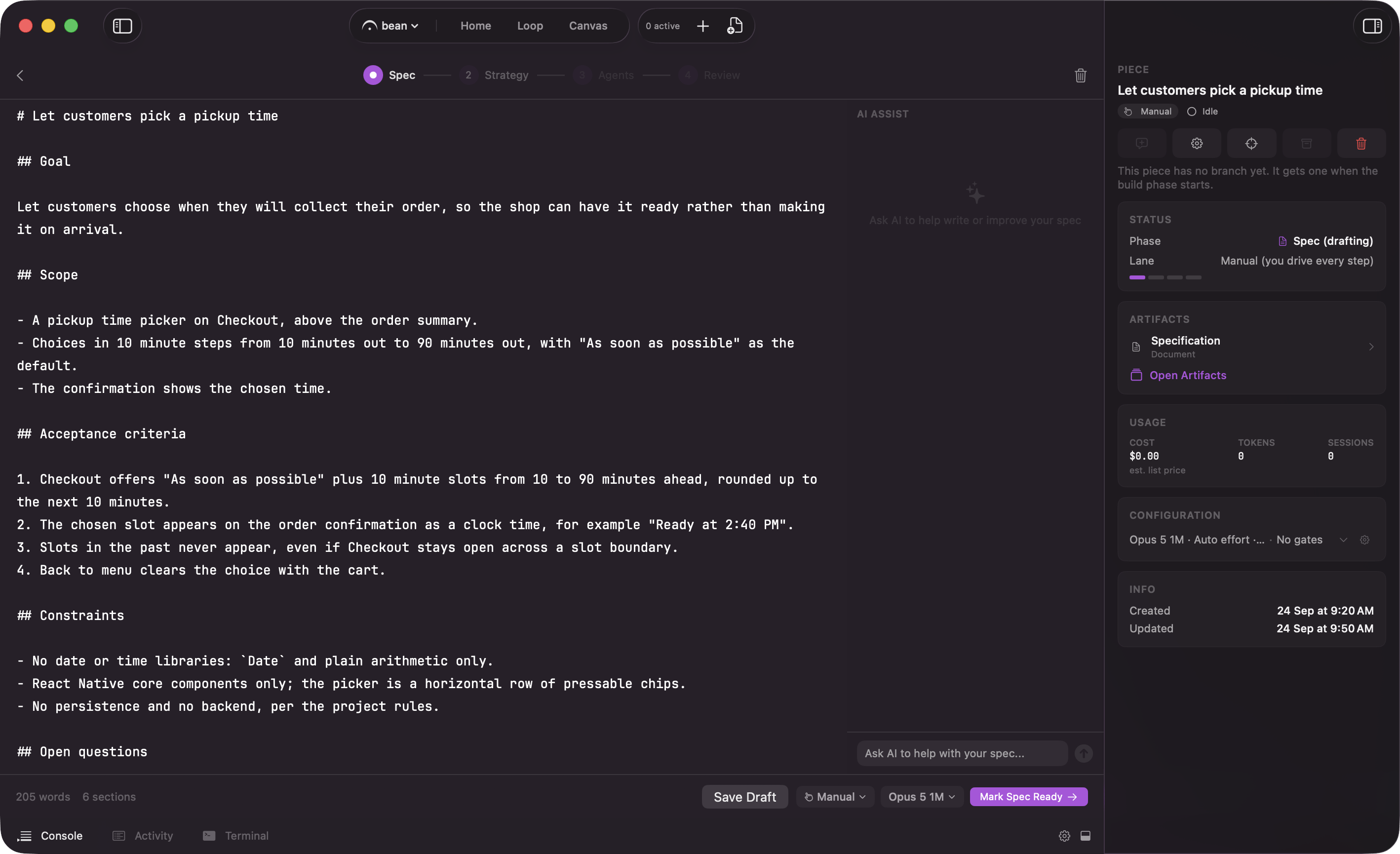
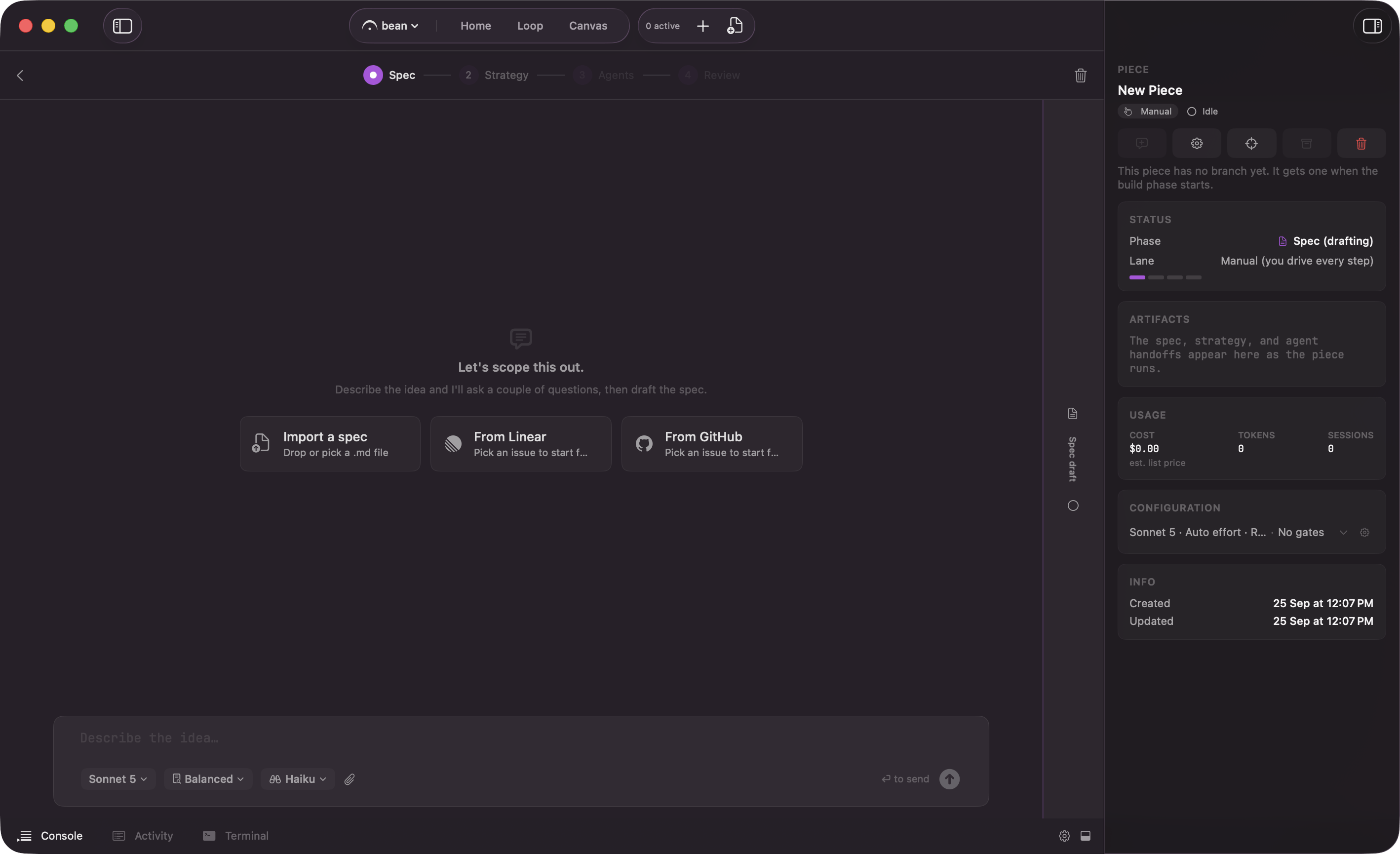
Every piece starts with a spec, and the spec starts with a conversation. Instead of a blank editor, Fermata opens a guided interview that turns a rough idea into a spec solid enough to build from. If you already wrote one, import it instead and skip the conversation.
## Why an interview
A vague spec produces a wandering build. If the model does not know what "done" looks like, the agents guess, and you spend Review untangling work that solved the wrong problem. The interview closes that gap up front. It asks the questions a careful reviewer would ask before the first line of code: what is in scope, what is explicitly out, what the edge cases are, what "done" means. You answer in plain language; the interview shapes those answers into a spec.
Because it reads the relevant parts of your codebase first, the questions are grounded in your actual code, not generic. It knows what already exists, so it asks about the parts that matter.
## The analysis it leaves behind
That read of your code is not thrown away when the spec is written. The reports the interview's research agents deliver are saved with the piece as `interview-research.json`. When strategy generation starts, its first step structures the spec and those reports into an analysis file, `analysis.json`, saved next to the spec, and the plan is written only after that returns.
The strategy plans from it. A strategy written with an analysis is labeled "Grounded"; one written without it is labeled "Ungrounded" and plans from the spec text alone. A failed extraction does not stop the run: the plan is written from the spec. Leave a note and **Regenerate**, and the strategy captures the analysis again before it rewrites. See [Strategy](/piece/strategy).
## Import a spec instead
If the spec already exists, click **Import a spec** or drop a `.md` file onto the interview. Fermata reads it in, runs it through the same readiness check a drafted spec gets, and tells you to review the draft, refine it by chatting, or mark it ready. **Format & validate** reformats a draft into the standard spec sections and re-checks it, which is worth a click after you hand-edit an imported file.
With Loop intake on (Edge) and a tracker connected, two more tiles sit beside **Import a spec**: **From Linear** and **From GitHub**, one per connected source. The GitHub tile only shows when the project's `origin` is on github.com. Either tile opens the same issue picker the New Piece sheet and the Backlog **+** use, and a pick feeds the interview instead of the chat opener. See [starting from an issue](/loop/from-an-issue) for the picker, the two ways to take an issue, and what an open blocker does.
## Evaluate before you commit
Once the draft has the sections a build needs, an **Evaluate** control appears. It runs an optional pass over the spec and reports back inline, in three parts:
* "Strong" lists what the spec already pins down.
* "Worth tightening" lists the gaps.
* "Blocking open questions" lists the things it thinks nobody can build from yet.
A readiness score out of 100 sits in the card's header. All of it is advisory. The evaluation never blocks the approve control and never advances the piece; it tells you what a careful reader would flag, and the call stays yours.
## Tune the interview
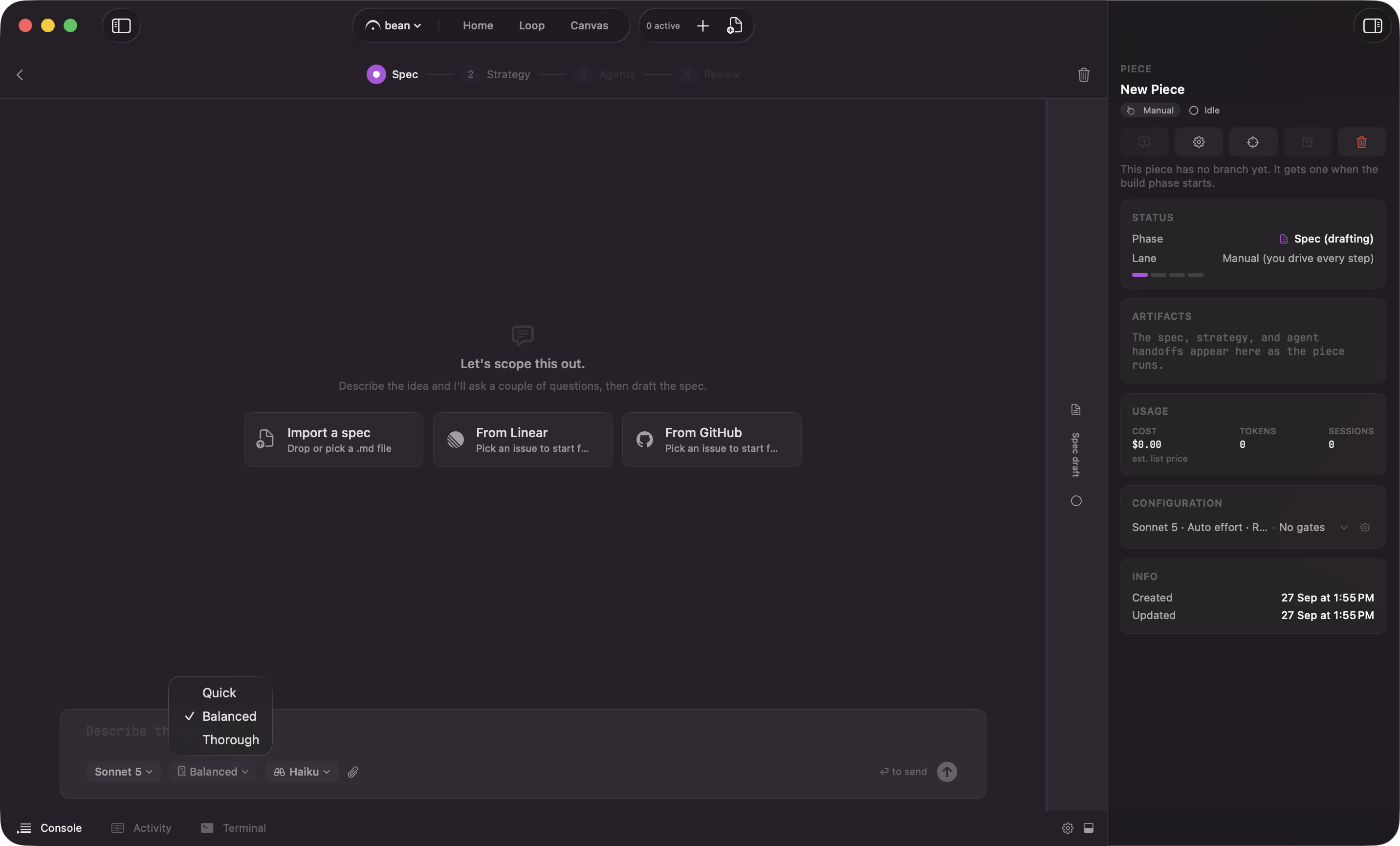
Three controls sit on the composer, so you can set them per interview rather than digging through settings. All three lock once the interview starts, because each is fixed when the interview spawns.
**Interview depth** decides how hard it pushes before it drafts:
| Depth | Behavior |
| - | - |
| "Quick" | Draft fast. Asks only the genuinely blocking questions, or none if the idea is already clear, and captures the rest as open questions. |
| "Balanced" | A focused round or two on what shapes goal, scope, and acceptance, then drafts. The default. |
| "Thorough" | Interviews exhaustively, across as many rounds as it takes, before drafting. |
Depth changes the *questioning* only. Repository exploration stays full at every level, so "Quick" is not a shallower read of your code; it is a shorter conversation about it.
Reach for "Thorough" when the work is ambiguous or expensive to get wrong, and "Quick" when you already know what you want and just need it written down. A session promoted from the Canvas starts at "Quick" on purpose, because the exploration already happened.
**Model** picks which model runs the interview, independently of the models the build phases use.
**Explore model** picks the model the spec's Explore subagents run on, separately from the interview session itself. It seeds from the app's remembered pick, itself starting on a fast, economical tier; changing it here updates that same app-level default, so the next interview's Explore model starts where you left this one.
To change the starting point rather than one interview, set **Spec Interview Depth** in Settings → Project (per project) or the default in Settings → Loop. See the [settings reference](/configuration/settings).
## Mark it ready
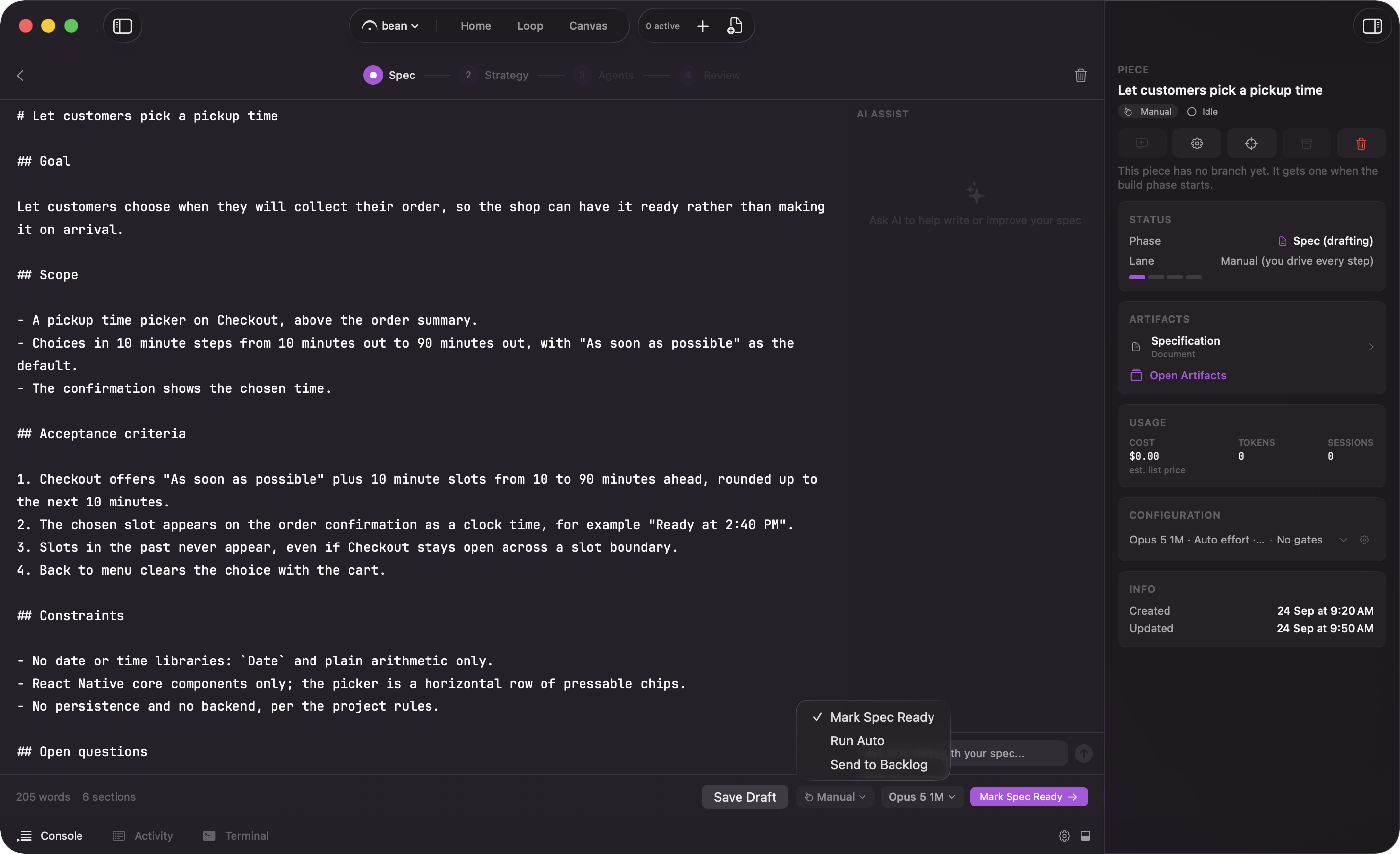
The approve control has three parts: a lane chip, a model chip, and the approve button next to them, its verb changing to match the lane you picked. The lane chip picks how far the piece runs on its own after approval; its three choices are covered on [lanes](/control/lanes). The model chip picks the model for the rest of the run; see [models and providers](/configuration/models) for what it governs and how a Flow Configuration override can still win.
Approving locks the spec. It is the contract for the whole run, and it does not get quietly rewritten once agents are working. If the plan shows the spec is wrong, step back with **Rework Spec** from [Strategy](/piece/strategy) before any agent starts; it discards the plan and reopens the spec for editing. After that, the way back is a Review round.
From here the piece moves to [Strategy](/piece/strategy), then [Agents](/piece/agents), then [Review](/piece/review-and-pull-request). See [your first piece](/start/first-piece) for the whole run end to end.
 ## Why an interview
A vague spec produces a wandering build. If the model does not know what "done" looks like, the agents guess, and you spend Review untangling work that solved the wrong problem. The interview closes that gap up front. It asks the questions a careful reviewer would ask before the first line of code: what is in scope, what is explicitly out, what the edge cases are, what "done" means. You answer in plain language; the interview shapes those answers into a spec.
Because it reads the relevant parts of your codebase first, the questions are grounded in your actual code, not generic. It knows what already exists, so it asks about the parts that matter.
## The analysis it leaves behind
That read of your code is not thrown away when the spec is written. The reports the interview's research agents deliver are saved with the piece as `interview-research.json`. When strategy generation starts, its first step structures the spec and those reports into an analysis file, `analysis.json`, saved next to the spec, and the plan is written only after that returns.
The strategy plans from it. A strategy written with an analysis is labeled "Grounded"; one written without it is labeled "Ungrounded" and plans from the spec text alone. A failed extraction does not stop the run: the plan is written from the spec. Leave a note and **Regenerate**, and the strategy captures the analysis again before it rewrites. See [Strategy](/piece/strategy).
## Import a spec instead
If the spec already exists, click **Import a spec** or drop a `.md` file onto the interview. Fermata reads it in, runs it through the same readiness check a drafted spec gets, and tells you to review the draft, refine it by chatting, or mark it ready. **Format & validate** reformats a draft into the standard spec sections and re-checks it, which is worth a click after you hand-edit an imported file.
## Why an interview
A vague spec produces a wandering build. If the model does not know what "done" looks like, the agents guess, and you spend Review untangling work that solved the wrong problem. The interview closes that gap up front. It asks the questions a careful reviewer would ask before the first line of code: what is in scope, what is explicitly out, what the edge cases are, what "done" means. You answer in plain language; the interview shapes those answers into a spec.
Because it reads the relevant parts of your codebase first, the questions are grounded in your actual code, not generic. It knows what already exists, so it asks about the parts that matter.
## The analysis it leaves behind
That read of your code is not thrown away when the spec is written. The reports the interview's research agents deliver are saved with the piece as `interview-research.json`. When strategy generation starts, its first step structures the spec and those reports into an analysis file, `analysis.json`, saved next to the spec, and the plan is written only after that returns.
The strategy plans from it. A strategy written with an analysis is labeled "Grounded"; one written without it is labeled "Ungrounded" and plans from the spec text alone. A failed extraction does not stop the run: the plan is written from the spec. Leave a note and **Regenerate**, and the strategy captures the analysis again before it rewrites. See [Strategy](/piece/strategy).
## Import a spec instead
If the spec already exists, click **Import a spec** or drop a `.md` file onto the interview. Fermata reads it in, runs it through the same readiness check a drafted spec gets, and tells you to review the draft, refine it by chatting, or mark it ready. **Format & validate** reformats a draft into the standard spec sections and re-checks it, which is worth a click after you hand-edit an imported file.
 With Loop intake on (Edge) and a tracker connected, two more tiles sit beside **Import a spec**: **From Linear** and **From GitHub**, one per connected source. The GitHub tile only shows when the project's `origin` is on github.com. Either tile opens the same issue picker the New Piece sheet and the Backlog **+** use, and a pick feeds the interview instead of the chat opener. See [starting from an issue](/loop/from-an-issue) for the picker, the two ways to take an issue, and what an open blocker does.
## Evaluate before you commit
Once the draft has the sections a build needs, an **Evaluate** control appears. It runs an optional pass over the spec and reports back inline, in three parts:
* "Strong" lists what the spec already pins down.
* "Worth tightening" lists the gaps.
* "Blocking open questions" lists the things it thinks nobody can build from yet.
A readiness score out of 100 sits in the card's header. All of it is advisory. The evaluation never blocks the approve control and never advances the piece; it tells you what a careful reader would flag, and the call stays yours.
## Tune the interview
Three controls sit on the composer, so you can set them per interview rather than digging through settings. All three lock once the interview starts, because each is fixed when the interview spawns.
**Interview depth** decides how hard it pushes before it drafts:
| Depth | Behavior |
| - | - |
| "Quick" | Draft fast. Asks only the genuinely blocking questions, or none if the idea is already clear, and captures the rest as open questions. |
| "Balanced" | A focused round or two on what shapes goal, scope, and acceptance, then drafts. The default. |
| "Thorough" | Interviews exhaustively, across as many rounds as it takes, before drafting. |
Depth changes the *questioning* only. Repository exploration stays full at every level, so "Quick" is not a shallower read of your code; it is a shorter conversation about it.
Reach for "Thorough" when the work is ambiguous or expensive to get wrong, and "Quick" when you already know what you want and just need it written down. A session promoted from the Canvas starts at "Quick" on purpose, because the exploration already happened.
**Model** picks which model runs the interview, independently of the models the build phases use.
**Explore model** picks the model the spec's Explore subagents run on, separately from the interview session itself. It seeds from the app's remembered pick, itself starting on a fast, economical tier; changing it here updates that same app-level default, so the next interview's Explore model starts where you left this one.
With Loop intake on (Edge) and a tracker connected, two more tiles sit beside **Import a spec**: **From Linear** and **From GitHub**, one per connected source. The GitHub tile only shows when the project's `origin` is on github.com. Either tile opens the same issue picker the New Piece sheet and the Backlog **+** use, and a pick feeds the interview instead of the chat opener. See [starting from an issue](/loop/from-an-issue) for the picker, the two ways to take an issue, and what an open blocker does.
## Evaluate before you commit
Once the draft has the sections a build needs, an **Evaluate** control appears. It runs an optional pass over the spec and reports back inline, in three parts:
* "Strong" lists what the spec already pins down.
* "Worth tightening" lists the gaps.
* "Blocking open questions" lists the things it thinks nobody can build from yet.
A readiness score out of 100 sits in the card's header. All of it is advisory. The evaluation never blocks the approve control and never advances the piece; it tells you what a careful reader would flag, and the call stays yours.
## Tune the interview
Three controls sit on the composer, so you can set them per interview rather than digging through settings. All three lock once the interview starts, because each is fixed when the interview spawns.
**Interview depth** decides how hard it pushes before it drafts:
| Depth | Behavior |
| - | - |
| "Quick" | Draft fast. Asks only the genuinely blocking questions, or none if the idea is already clear, and captures the rest as open questions. |
| "Balanced" | A focused round or two on what shapes goal, scope, and acceptance, then drafts. The default. |
| "Thorough" | Interviews exhaustively, across as many rounds as it takes, before drafting. |
Depth changes the *questioning* only. Repository exploration stays full at every level, so "Quick" is not a shallower read of your code; it is a shorter conversation about it.
Reach for "Thorough" when the work is ambiguous or expensive to get wrong, and "Quick" when you already know what you want and just need it written down. A session promoted from the Canvas starts at "Quick" on purpose, because the exploration already happened.
**Model** picks which model runs the interview, independently of the models the build phases use.
**Explore model** picks the model the spec's Explore subagents run on, separately from the interview session itself. It seeds from the app's remembered pick, itself starting on a fast, economical tier; changing it here updates that same app-level default, so the next interview's Explore model starts where you left this one.
 To change the starting point rather than one interview, set **Spec Interview Depth** in Settings → Project (per project) or the default in Settings → Loop. See the [settings reference](/configuration/settings).
## Mark it ready
The approve control has three parts: a lane chip, a model chip, and the approve button next to them, its verb changing to match the lane you picked. The lane chip picks how far the piece runs on its own after approval; its three choices are covered on [lanes](/control/lanes). The model chip picks the model for the rest of the run; see [models and providers](/configuration/models) for what it governs and how a Flow Configuration override can still win.
To change the starting point rather than one interview, set **Spec Interview Depth** in Settings → Project (per project) or the default in Settings → Loop. See the [settings reference](/configuration/settings).
## Mark it ready
The approve control has three parts: a lane chip, a model chip, and the approve button next to them, its verb changing to match the lane you picked. The lane chip picks how far the piece runs on its own after approval; its three choices are covered on [lanes](/control/lanes). The model chip picks the model for the rest of the run; see [models and providers](/configuration/models) for what it governs and how a Flow Configuration override can still win.
 Approving locks the spec. It is the contract for the whole run, and it does not get quietly rewritten once agents are working. If the plan shows the spec is wrong, step back with **Rework Spec** from [Strategy](/piece/strategy) before any agent starts; it discards the plan and reopens the spec for editing. After that, the way back is a Review round.
From here the piece moves to [Strategy](/piece/strategy), then [Agents](/piece/agents), then [Review](/piece/review-and-pull-request). See [your first piece](/start/first-piece) for the whole run end to end.
Approving locks the spec. It is the contract for the whole run, and it does not get quietly rewritten once agents are working. If the plan shows the spec is wrong, step back with **Rework Spec** from [Strategy](/piece/strategy) before any agent starts; it discards the plan and reopens the spec for editing. After that, the way back is a Review round.
From here the piece moves to [Strategy](/piece/strategy), then [Agents](/piece/agents), then [Review](/piece/review-and-pull-request). See [your first piece](/start/first-piece) for the whole run end to end.