> ## Documentation Index
> Fetch the complete documentation index at: https://docs.fermata.run/llms.txt
> Use this file to discover all available pages before exploring further.
# Strategy
> The plan a piece is built from: the approach, the files to change, the work split into agents, and the risks. You annotate it, regenerate it, edit it, or approve it.
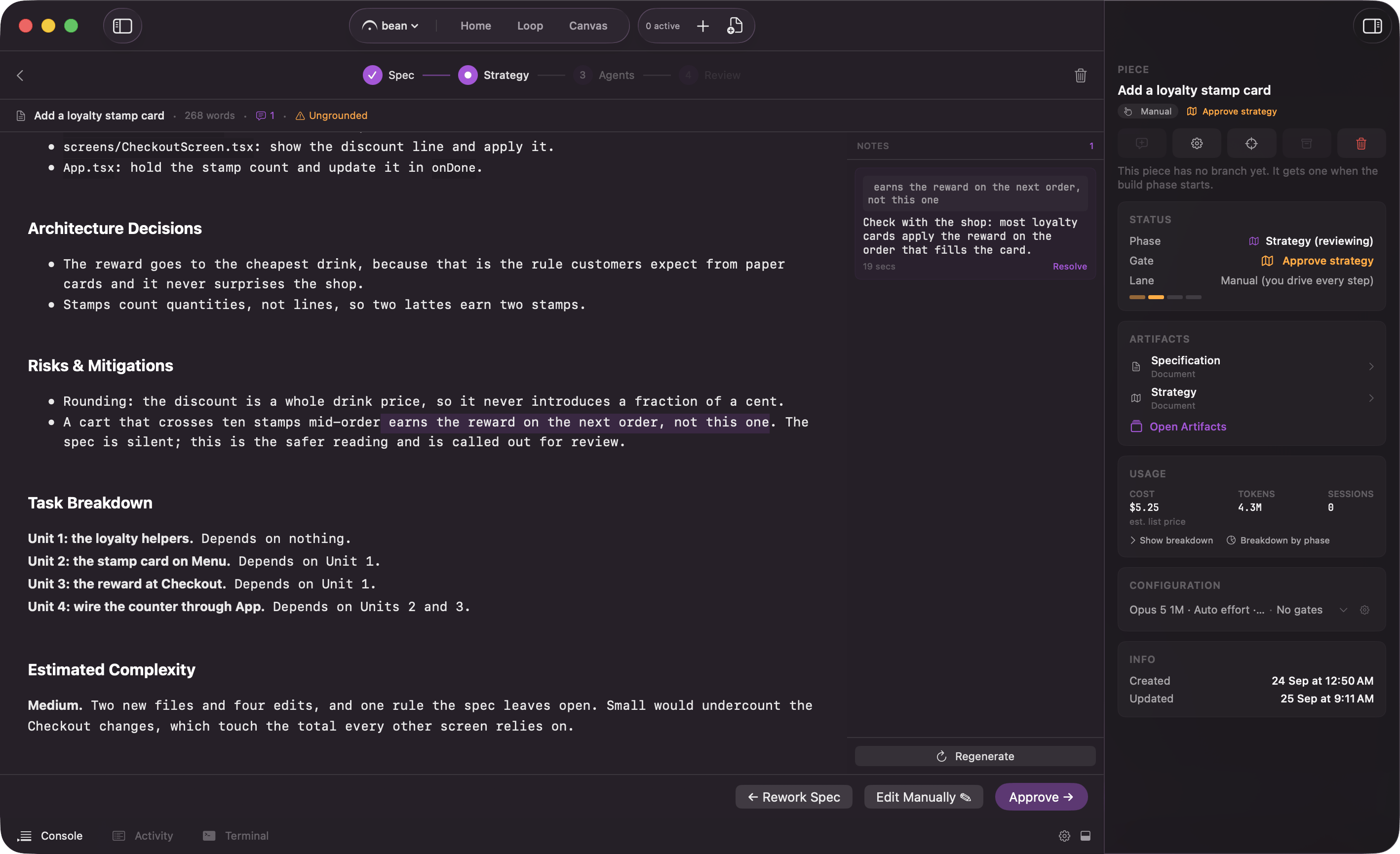
Approving the spec starts strategy generation. Its first step captures the codebase analysis from the spec and the interview's research; only then does Fermata read the spec and the project source and write the plan the rest of the piece is built from. It covers the approach, the files it expects to change, how the work splits into agents, and the risks worth calling out. It is a document you read, not a config file you fill in.
Generation also fixes the commit the plan is built on: it fetches `origin/` fresh and pins what it reads as the piece's `baseCommit`, so the agent graph and the piece's own worktree fork from that same commit rather than whatever `origin` has moved to by the time agents start. The Activity feed records it, for example "Strategy reads main at 4f2a91c (fetched from origin)". If the fetch fails, it falls back to the local branch tip, and the Activity line says so.
While it runs, the header reads "Generating" and the surface shows what the agent is currently exploring rather than pretending the plan exists yet. **Stop** halts generation and leaves the phase recoverable, with **Generate Strategy** to try again.
## Grounded or Ungrounded
A chip in the header says which of two things you are reading.
| Chip | What it means |
| - | - |
| "Grounded" | "Strategy is grounded in the interview's codebase analysis." |
| "Ungrounded" | "No analysis captured, so this plan came from the spec alone. Generating the strategy captures one first; regenerate to try again." |
The difference is whether the analysis step landed before the plan was written. Grounded plans know what already exists in your repo; ungrounded plans are working from the spec text. Neither blocks anything, but an "Ungrounded" chip is a good reason to leave a note and **Regenerate**, which captures the analysis again before rewriting, or at least to read the plan harder before approving it. See [the interview and the spec](/piece/interview-and-spec) for where the analysis comes from.
## Estimated Complexity
The strategy template asks for an `## Estimated Complexity` section, resolving to one of four sizes: Trivial, Small, Medium, or Large. It is a sizing hint, not a gate: **Approve** stays enabled with or without it, and a strategy that states no readable size falls back to Medium.
What it feeds is the default split budget for the [Agents](/piece/agents) phase, the ceiling on how many agents that phase spreads the work across before you override it. See [limits](/loop/limits) for the size-to-cap table and how to override it.
## Notes in the margin
You are not stuck with what the model produced. Select any run of text in the document and leave a note on it. Notes stack up in the "NOTES" panel down the right margin, each showing the snippet it is anchored to, and the header counts how many are still open.
Every note has a **Resolve** button. Resolving is not cosmetic: the approve control stays disabled while any note is unresolved, and tells you how many are left. That is deliberate. An open note is an objection you raised and nobody answered, and approving over it is how a plan gets built that you already disagreed with.
## Regenerate
**Regenerate**, at the bottom of the "NOTES" panel, rewrites the strategy with your open notes folded in. It stays inactive until at least one note exists, because regenerating with no feedback just rolls the dice again.
Two or three passes until the plan reads right is normal.
## Edit Manually
**Edit Manually** opens the document for direct editing, and flips to **Done Editing** while you are in it. Use it for the small corrections that are faster to type than to explain: a wrong filename, a missing step, an ordering you want swapped. It is disabled while generation is in flight.
## Approve
**Approve** closes the phase and moves the piece to [Agents](/piece/agents), decomposing the plan into the agent graph on the way. It is disabled while either of two things is true:
* Any note is unresolved. The tooltip counts them.
* The document is missing a required section. The tooltip names which ones.
Whether the piece stops here for your approval at all depends on how much you let it run on its own. That is the strategy gate, covered on [gates](/control/gates).
## Rework Spec
**Rework Spec** is the one backward edge out of this phase. Confirming it discards the strategy and its notes, and reopens the spec for editing; marking the spec ready again generates a fresh strategy.
It is offered only while stepping back is genuinely free: before any agent has ever started, and never while generation or decomposition is in flight. Past that point the piece is running, and the way back is a [Review](/piece/review-and-pull-request) round instead.
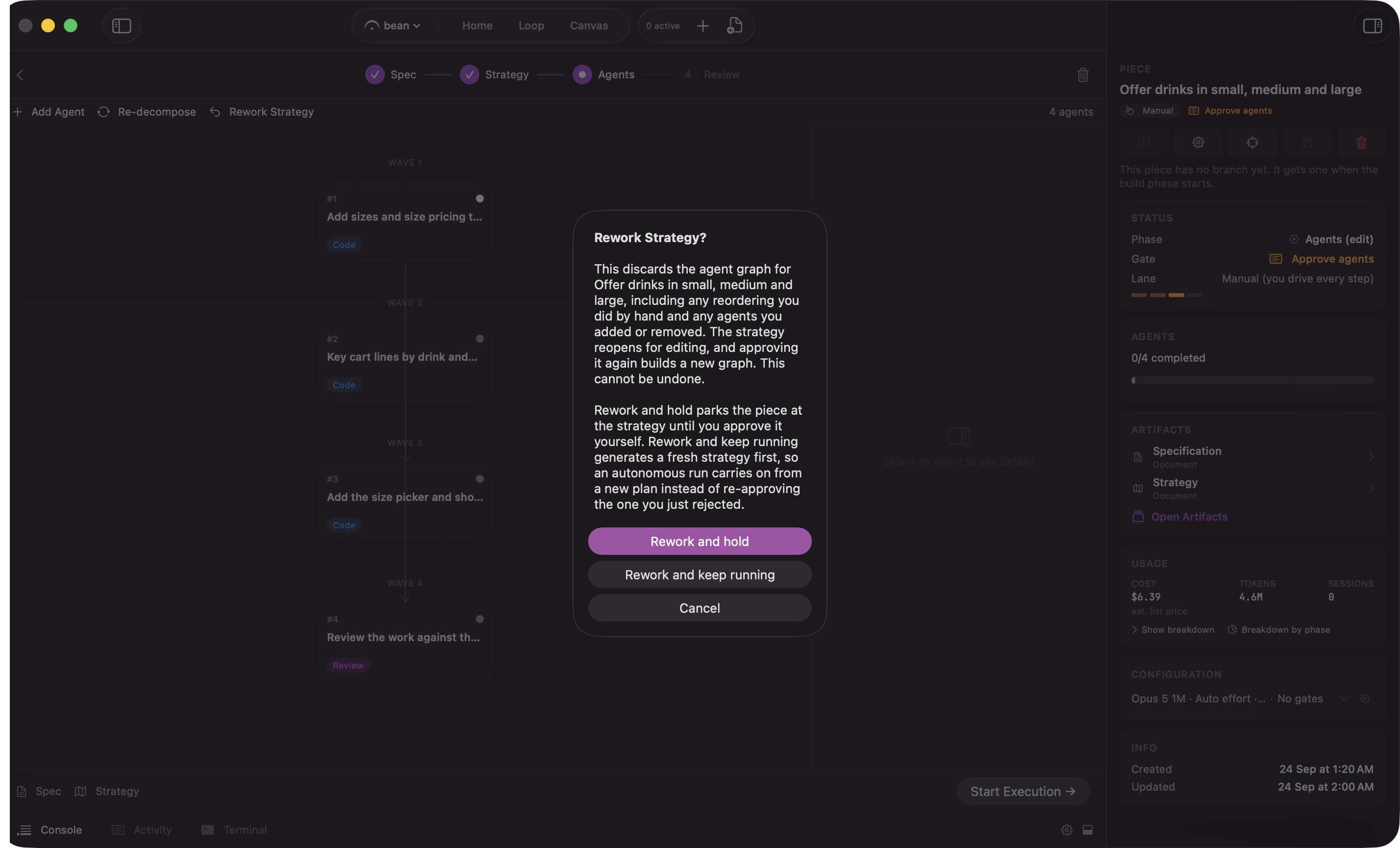
The confirmation names exactly what is lost, and offers two ways to confirm it, not one. **Rework and hold** parks the piece at the reopened spec until you approve it yourself. **Rework and keep running** reopens the spec too, but lets an autonomous run carry the piece forward from it on its own instead of waiting for you. Both buttons discard the same strategy; the choice is only about what happens next, and neither can be undone.
Rework is counted. Every **Rework Spec** and every **Rework Strategy** (the same backward step, taken from [Agents](/piece/agents) instead) lands in the piece's "Rework" card in the inspector, newest first, and the count is never capped or trimmed. A row that chose **Rework and hold** carries a "Held" pill. If you land back on this document with a "Strategy reopened from Agents" row at the top of that card, that is what happened: the agent graph you had was discarded, and approving this strategy again decomposes a fresh one. A piece that has bounced off its plan six times should look like it.
 While it runs, the header reads "Generating" and the surface shows what the agent is currently exploring rather than pretending the plan exists yet. **Stop** halts generation and leaves the phase recoverable, with **Generate Strategy** to try again.
## Grounded or Ungrounded
A chip in the header says which of two things you are reading.
| Chip | What it means |
| - | - |
| "Grounded" | "Strategy is grounded in the interview's codebase analysis." |
| "Ungrounded" | "No analysis captured, so this plan came from the spec alone. Generating the strategy captures one first; regenerate to try again." |
The difference is whether the analysis step landed before the plan was written. Grounded plans know what already exists in your repo; ungrounded plans are working from the spec text. Neither blocks anything, but an "Ungrounded" chip is a good reason to leave a note and **Regenerate**, which captures the analysis again before rewriting, or at least to read the plan harder before approving it. See [the interview and the spec](/piece/interview-and-spec) for where the analysis comes from.
## Estimated Complexity
The strategy template asks for an `## Estimated Complexity` section, resolving to one of four sizes: Trivial, Small, Medium, or Large. It is a sizing hint, not a gate: **Approve** stays enabled with or without it, and a strategy that states no readable size falls back to Medium.
What it feeds is the default split budget for the [Agents](/piece/agents) phase, the ceiling on how many agents that phase spreads the work across before you override it. See [limits](/loop/limits) for the size-to-cap table and how to override it.
## Notes in the margin
You are not stuck with what the model produced. Select any run of text in the document and leave a note on it. Notes stack up in the "NOTES" panel down the right margin, each showing the snippet it is anchored to, and the header counts how many are still open.
Every note has a **Resolve** button. Resolving is not cosmetic: the approve control stays disabled while any note is unresolved, and tells you how many are left. That is deliberate. An open note is an objection you raised and nobody answered, and approving over it is how a plan gets built that you already disagreed with.
## Regenerate
**Regenerate**, at the bottom of the "NOTES" panel, rewrites the strategy with your open notes folded in. It stays inactive until at least one note exists, because regenerating with no feedback just rolls the dice again.
Two or three passes until the plan reads right is normal.
## Edit Manually
**Edit Manually** opens the document for direct editing, and flips to **Done Editing** while you are in it. Use it for the small corrections that are faster to type than to explain: a wrong filename, a missing step, an ordering you want swapped. It is disabled while generation is in flight.
## Approve
**Approve** closes the phase and moves the piece to [Agents](/piece/agents), decomposing the plan into the agent graph on the way. It is disabled while either of two things is true:
* Any note is unresolved. The tooltip counts them.
* The document is missing a required section. The tooltip names which ones.
Whether the piece stops here for your approval at all depends on how much you let it run on its own. That is the strategy gate, covered on [gates](/control/gates).
## Rework Spec
**Rework Spec** is the one backward edge out of this phase. Confirming it discards the strategy and its notes, and reopens the spec for editing; marking the spec ready again generates a fresh strategy.
It is offered only while stepping back is genuinely free: before any agent has ever started, and never while generation or decomposition is in flight. Past that point the piece is running, and the way back is a [Review](/piece/review-and-pull-request) round instead.
The confirmation names exactly what is lost, and offers two ways to confirm it, not one. **Rework and hold** parks the piece at the reopened spec until you approve it yourself. **Rework and keep running** reopens the spec too, but lets an autonomous run carry the piece forward from it on its own instead of waiting for you. Both buttons discard the same strategy; the choice is only about what happens next, and neither can be undone.
While it runs, the header reads "Generating" and the surface shows what the agent is currently exploring rather than pretending the plan exists yet. **Stop** halts generation and leaves the phase recoverable, with **Generate Strategy** to try again.
## Grounded or Ungrounded
A chip in the header says which of two things you are reading.
| Chip | What it means |
| - | - |
| "Grounded" | "Strategy is grounded in the interview's codebase analysis." |
| "Ungrounded" | "No analysis captured, so this plan came from the spec alone. Generating the strategy captures one first; regenerate to try again." |
The difference is whether the analysis step landed before the plan was written. Grounded plans know what already exists in your repo; ungrounded plans are working from the spec text. Neither blocks anything, but an "Ungrounded" chip is a good reason to leave a note and **Regenerate**, which captures the analysis again before rewriting, or at least to read the plan harder before approving it. See [the interview and the spec](/piece/interview-and-spec) for where the analysis comes from.
## Estimated Complexity
The strategy template asks for an `## Estimated Complexity` section, resolving to one of four sizes: Trivial, Small, Medium, or Large. It is a sizing hint, not a gate: **Approve** stays enabled with or without it, and a strategy that states no readable size falls back to Medium.
What it feeds is the default split budget for the [Agents](/piece/agents) phase, the ceiling on how many agents that phase spreads the work across before you override it. See [limits](/loop/limits) for the size-to-cap table and how to override it.
## Notes in the margin
You are not stuck with what the model produced. Select any run of text in the document and leave a note on it. Notes stack up in the "NOTES" panel down the right margin, each showing the snippet it is anchored to, and the header counts how many are still open.
Every note has a **Resolve** button. Resolving is not cosmetic: the approve control stays disabled while any note is unresolved, and tells you how many are left. That is deliberate. An open note is an objection you raised and nobody answered, and approving over it is how a plan gets built that you already disagreed with.
## Regenerate
**Regenerate**, at the bottom of the "NOTES" panel, rewrites the strategy with your open notes folded in. It stays inactive until at least one note exists, because regenerating with no feedback just rolls the dice again.
Two or three passes until the plan reads right is normal.
## Edit Manually
**Edit Manually** opens the document for direct editing, and flips to **Done Editing** while you are in it. Use it for the small corrections that are faster to type than to explain: a wrong filename, a missing step, an ordering you want swapped. It is disabled while generation is in flight.
## Approve
**Approve** closes the phase and moves the piece to [Agents](/piece/agents), decomposing the plan into the agent graph on the way. It is disabled while either of two things is true:
* Any note is unresolved. The tooltip counts them.
* The document is missing a required section. The tooltip names which ones.
Whether the piece stops here for your approval at all depends on how much you let it run on its own. That is the strategy gate, covered on [gates](/control/gates).
## Rework Spec
**Rework Spec** is the one backward edge out of this phase. Confirming it discards the strategy and its notes, and reopens the spec for editing; marking the spec ready again generates a fresh strategy.
It is offered only while stepping back is genuinely free: before any agent has ever started, and never while generation or decomposition is in flight. Past that point the piece is running, and the way back is a [Review](/piece/review-and-pull-request) round instead.
The confirmation names exactly what is lost, and offers two ways to confirm it, not one. **Rework and hold** parks the piece at the reopened spec until you approve it yourself. **Rework and keep running** reopens the spec too, but lets an autonomous run carry the piece forward from it on its own instead of waiting for you. Both buttons discard the same strategy; the choice is only about what happens next, and neither can be undone.
 Rework is counted. Every **Rework Spec** and every **Rework Strategy** (the same backward step, taken from [Agents](/piece/agents) instead) lands in the piece's "Rework" card in the inspector, newest first, and the count is never capped or trimmed. A row that chose **Rework and hold** carries a "Held" pill. If you land back on this document with a "Strategy reopened from Agents" row at the top of that card, that is what happened: the agent graph you had was discarded, and approving this strategy again decomposes a fresh one. A piece that has bounced off its plan six times should look like it.