> ## Documentation Index
> Fetch the complete documentation index at: https://docs.fermata.run/llms.txt
> Use this file to discover all available pages before exploring further.
# Architecture overview
> Fermata is a native macOS app that hosts the Claude Code CLI as a real subprocess. The harness is the product. The engine underneath is swappable.
Fermata is a native macOS app. No Electron and no cross-platform shim: it is SwiftUI running as one process on your Mac. There is one embedded web view, the rich diff viewer behind [Edge](/configuration/edge), which hosts a CodeMirror renderer for syntax-highlighted diffs.
## The harness is the product
The durable value in Fermata is not the model. It is the harness: the phases, the readiness score, the review, the "Needs You" card, and the local analytics. The model underneath is a swappable backend. You can run the engine on Claude via Anthropic, Amazon Bedrock, or Google Vertex today, and the harness works the same on all of them.
That is why Fermata hosts the Claude Code CLI rather than reimplementing the agent loop or embedding an SDK in the app binary. The CLI is the canonical Claude Code: it handles context management, tool use, permission gates, and session state the same way `claude` does in your terminal. When Anthropic releases updates, Fermata inherits them without a code change. Copy a session's resume command from the inspector, paste it into Terminal, and the conversation continues there, because there is only one state.
## How a session runs
Sessions Fermata spawns run as isolated Claude Code processes, each in its own git worktree when enabled. Same repo, separate filesystem state. Each agent works in its own checkout without touching what the others are doing.
Fermata and the agent talk over a live, line-structured message stream. Every assistant message, every tool call, every permission request flows into the UI in real time. You are not looking at a polled status page or a rendered transcript after the fact. You are watching the agent work as it works.
Approvals run the other direction. When an agent wants to run a tool that its permission profile does not auto-allow, it pauses and asks. You answer from the inspector; the answer flows back up the same stream; the agent unblocks and continues.
## How a piece's agents run
A piece's agents run inside the piece's own worktree, each on its own session, in the waves the strategy set. State that matters (the session list, each session's message history, the worktree lifecycle, any outbound sync) is serialized through dedicated owners and never mutated from multiple threads at once. The UI runs on the main thread. The agents run in the background.
## Git worktrees, in plain terms
When enabled, a session runs in a git worktree: not a copy, not a clone, not a branch. A worktree is a live checkout of the same repository at a different filesystem path. Sessions share history with the main repo, and each has its own working state. Agents can edit the codebase without colliding, and merging back is just a normal git merge.
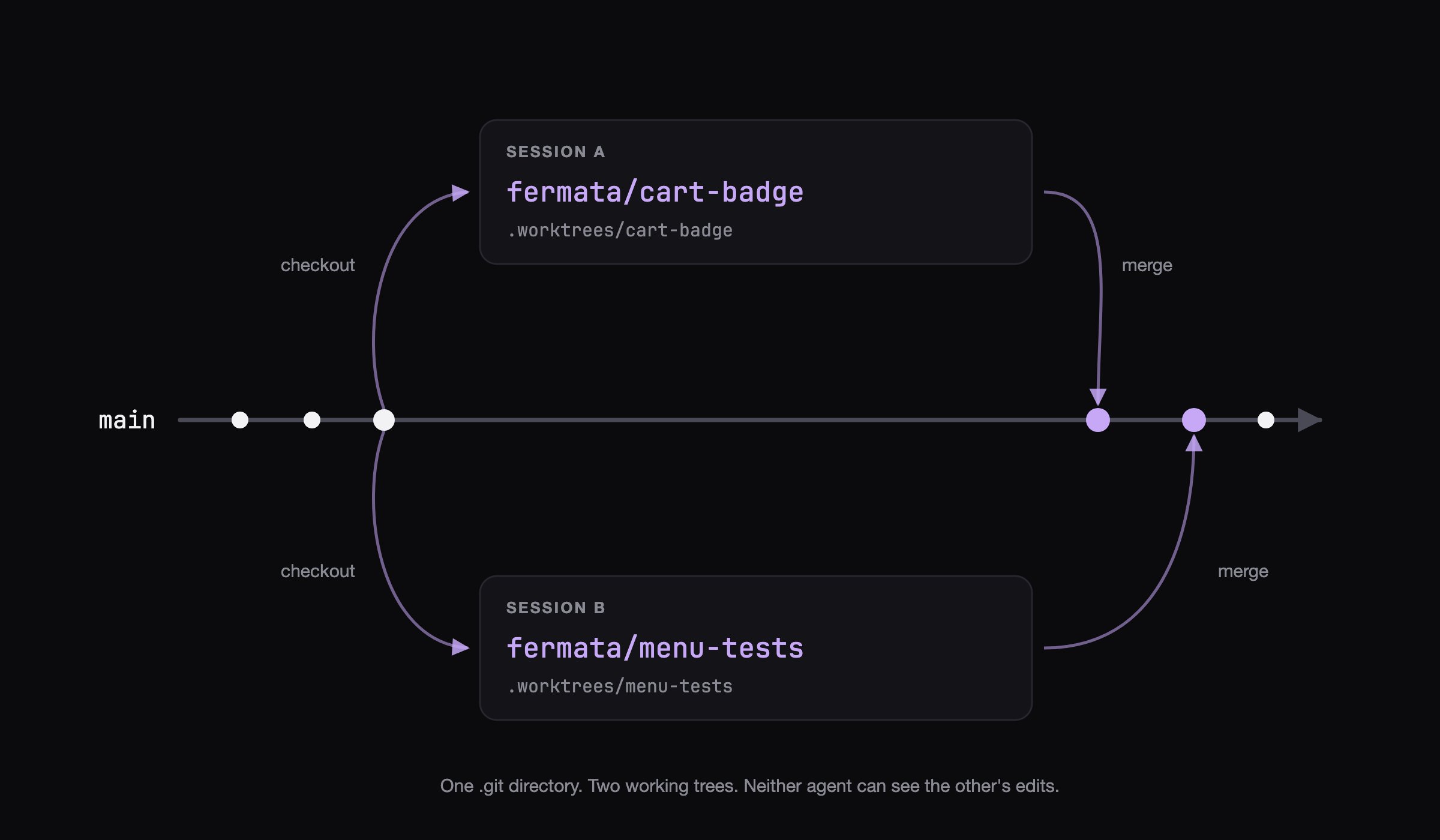 Fermata creates the worktree when the session spawns and cleans it up when the work lands. A standalone session cleans up on its own only when it stopped with nothing to lose, and otherwise waits for an explicit delete from the sidebar. A piece's worktree survives the whole review loop and goes when the pull request merges. Both rules are on [review and the pull request](/piece/review-and-pull-request). If a session crashes and leaves a worktree behind, Fermata surfaces it for manual cleanup the next time you open the project.